Be honest now, where did you get all those email addresses for your mailing list?

This week the Irish Data Protection Commissioner in Ireland fined some large companies for sending out unsolicited marketing and according to the Irish Times:

“Companies that persist in sending unsolicited marketing messages by text and email will be prosecuted and face fines of up to €250,00 in court, the Data Protection Commissioner (DPC) warned.”

It’s common to find businesses adding people to mailing lists or text alert lists without first gaining permission.  I know I get a bundle of unsolicited emails every day and many text alerts from companies I buy from.  But why should small businesses care?  Surely the more people we reach the better the results of our campaign will be?

Not necessarily, reaching the right people and sending targeted emails can be far more effective than sending out thousands of emails to the wrong people or those who have no interest in what you do.

Here’s my four top reasons for getting email opt in, can you think of any others?

Reason 1 The Law

Many will read the story from the Irish Times and shrug, is it likely that they will prosecute small businesses who add a few people they’ve met, or members of a local networking group to their mailing list without asking first?  The answer is that we don’t know but the law is the law and as businesses we should comply.

Anyone can complain to the Data Commissioners office if they receive unsolicited communication, is it worth the risk?   Here’s a really handy guide on complying with data protection legislation from the Data Protection Commissioner.

Reason 2 The cost

Many email marketing software providers including the two I use Newsletter.ie and Mailchimp offer a free service up to a certain number of subscribers (2,500 for Newsletter.ie and 2,000 for Mailchimp).  It is when we hit these limits and have to start paying per email or per subscriber to send our mails that we might realise the benefits of having a clean list.  Is it worth spending money on sending an email to someone who may not want to receive it?  Who hasn’t subscribed?  To be cost effective at this stage you will need to ensure you have a clean list.

The easiest way to clean your list is to try and engage with the people who haven’t opened your emails at all or recently, or those who don’t click the links within your emails.  It’s worth sending an email to these inactive subscribers to check in with them and make sure they still wish to receive your communications. Of course you may see some subscriber drop off, and this is only to be expected with a list you’ve had for a while but it will also ensure that every penny spent on your email marketing is spent on getting an email to someone who wants it.

Reason 3 Sentiment

What do you want someone to feel when they think of you and your company?  I’m sure you want them to associate positive emotions with you, you want them to be happy, impressed, relieved, delighted.  You don’t want them to be annoyed, sad, frustrated or angry.  It may seem extreme but by sending people marketing messages they don’t want and haven’t asked for you could be evoking these negative emotions.

Of course people can choose to unsubscribe from your list but they may not do this immediately, you are asking them to take time out of their day to do something so they will just continue to delete them or worse mark them as spam until they reach tipping point and finally unsubscribe.

Reason 4 Don’t get marked for spam

When a recipient marks your email that as spam it puts a black mark next to your email address, if this happens too often your email marketing software provider will suspend your account meaning that you can no longer send out newsletters or marketing emails to your list.

If you are not using email marketing software and you get too many spam reports it can result in your email address or even your domain getting blocked by many email service providers meaning that even your regular emails may not reach the intended recipient.

If you are sending unsolicited emails to people who didn’t opt in there is more chance of them marking them as spam.

Can you think of any other reasons to get opt in?  Do you think that it’s worth it?  I’d love to hear your thoughts.

photo credit: dok1 via photopin cc

And if you enjoyed this blog post why not subscribe to my newsletter or my blog posts via email. Click here for more info.

worstwords

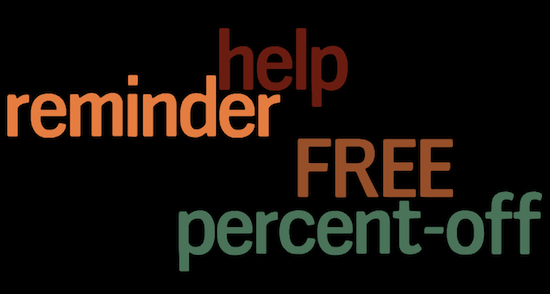
There are certain words that when included in email subject lines can have a detrimental effect.  They can result in emails not being opened but worse than that they can cause newsletter subscribers to unsubscribe, mark your email as spam, or your email may never reach the recipient and instead get blocked by spam filters.

According to Mailchimp the four words (or phrases) that should be avoided at all costs are…

Source Mailchimp

Does this surprise you? I know I’ve included one of these in a recent email subject line, have you?

If you enjoyed this post click here to subscribe to our blog updates by email.

get email subscribers

Poor old email marketing has taken a backseat to social networks in recent years but it’s a place it really doesn’t deserve.  Email marketing is still hugely effective, can offer direct and measurable return on investment and according to a recent study is the way that 77% of people still want to receive their marketing messages.

The first step towards effective email marketing is building a list.  Even if you are not quite ready to start a campaign you should be collecting emails so that when you are ready you have a list of subscribers ready to receive it.  But before I share my tips on list building here’s some important considerations.

Get permission

Getting permission from subscribers is essential for effective email marketing.  It may be tempting to collect a bunch of business cards at a meeting and then add all the email addresses to your list but it’s also against data protection guidelines in Ireland.  Even putting these guidelines aside it’s bad practice to send an email shot to people who didn’t request it, here’s why:

When someone receives your email you want them to be happy, you want them to associate a positive emotion when they think about your brand.  I get an email from Mari Smith every week, she shares 5 links that she thinks her subscribers will find valuable and I’m always pleased to get it, she’s a great curator.  Sometimes this email also contains information about her latest offer, webinar or course.  I’m also pleased to hear about this, Mari’s webinars are well worth attending.   Sending an email to someone who didn’t request it can have the opposite effect.  I started getting unsolicited emails from a deal site last year.  Every day they would hit my inbox and every day I’d delete them.  Every time I saw them I’d get annoyed,  yes it only took clicking one button to unsubscribe but that still seemed like work to me, I didn’t ask for the email and now I had to put effort into unsubscribing.  The result – I would never buy anything from that particular company.

Avoid getting marked as spam – In the example above it would have been much easier for me to hit the spam button than unsubscribe and this is another reason that getting permission is crucial.  When someone hits the spam button on your email it doesn’t just recognise the email as spam locally, the email address that it comes from gets a black mark next to it, get enough black marks and you’ll find that email providers will not only block email from that address but from all emails from that domain.

Make it easy to unsubscribe

People unsubscribing from your email list is bad right?  Well yes it does seem a bit disheartening when someone chooses to unsubscribe from your list but remember if they have no use for your email, if they don’t want the information you send they are either not a potential customer or they simply don’t want what you are sending them.  We can learn from this, a good clean email list full of potential customers is the ideal so if someone isn’t a lead there is no real value in having them there.  If we get a lot of unsubcribers from one particular newsletter we should look at the content and see what it is that may have caused them to unsubscribe.  What could have put them off?  Were you selling too hard?  Did the email look spammy?  Or has it been so long since they subscribed, or so long since you sent your last mail that they don’t remember why they subscribed?

I recently heard that an airline had sent an email to those who hadn’t opened their emails asking if the recipient still wanted to get the newsletter.  This is a fantastic way to reconnect with dormant subscribers and to keep the list clean.  It also shows that they care about their customers and potential customers.

Segment your list

Some people may want to hear from you once a month, some may want to get something once a week.  Existing customers may want different information to leads, different sorts of customers will want to be treated differently.  For this reason you should be thinking about segmenting your list in advance.  You can do this by asking what sort of content subscribers want to receive at the sign up stage and you can segment yourself by filtering subscribers in to different categories.

How to get subscribers

  • Put a subscribe form on your website.  If you want to encourage subscribers make sure this is prominent on your website, preferably above the fold.
Razor Social
Great call to action from Razor Social – www.razorsocial.com
  • Add a call to action to the subscribe form.  This can be as simple as telling people what they get in return for subscribing.  For me it’s ‘social media hints and tips’, others offer a monthly prize for subscribers or a freebie.  On my latest joint project ‘We Teach Social‘ we’re offering a free course to one of our subscribers.
Offer something in return for the subscribe
  • A strong call to action always works best so ‘Subscribe to our newsletter for monthly social media hints and tips’ will work better than ‘Would you like to subscribe to our newsletter? We’ll send you monthly social media hints and tips’. Telling rather than asking someone what to do will get better results (in spite of what your Mother might have told you).
  • As well as adding the subscribe form to your main website it’s worth creating a page on your site dedicated to collecting email subscribers.  This gives you the opportunity to tell people a bit more about what they will get, leaves room for more segmentation options and gives you a landing page to share on your social media channels when asking for subscribers.
  • Consider a pop up.  Pop up email subscribe boxes that appear once you have spent some time on a site are annoying to some but they do attract new subscribers.  I’m not sure Ireland is ready for these yet but it is worth testing it on some pages to see if your subscriber rate increases without loosing page views on your website.
pop up email subscribe
Pop up subscribe window from Groupon
  • If you have already embarked on email marketing ask for some testimonials from existing subscribers.  Ask them to tell you what they like about your emails and add them to your newsletter subscribe page.  This will encourage new subscribers as they will be reassured that it’s worthwhile – that you are delivering what you promise.
  • If you have already embarked on email marketing include a newsletter archive on your sign up page.  Again this will encourage potential subscribers to make the leap as they will see exactly what they are signing up to.
  • Ask for subscribers on your social media channels.  I tweet once a week about my mailing list and always get new subscribers.  If you run a Facebook competition make sure that getting email opt in is part of the entry process.
  • Add a call to action to the  bottom of blog posts.  You can either add a subscribe form here or link to your subscribe page.
  • Add a link to your email subscribe page / form to your email signature.
  • If your business has a physical location – a shop or an office that customers visit – try and capture email addresses there.  Ask people to subscribe to be in with the chance of winning something.  I know I put my business card in to a bowl at Wagamama a long time ago as part of a contest and I’ve been getting special offers from them ever since.  As I am a customer of Wagamama already these offers are always welcome and encourage me to visit more often.  If you don’t have a premises take advantage of trade shows and events to encourage subscribers in a similar manner.
wagamama email offer
Email offers from Wagamama encourage me to visit more often
  • If you run an online store it’s easier to capture email addresses.  Ensure that you are asking for the subscribe opt in as part of the check out process.
  • When you send emails out ask people to tell their friends, give them a link to your subscribe page that they can share with others.

What have I left out? What tips do you have for getting new email subscribers? 

If you are based in or close to Kildare  book a spot on my email marketing for beginners workshop in Naas on 3rd & 4th December. You will learn more about how to best utilise email marketing for your business and create an email to send to your customers in time for Christmas.  Call 045 897610 to book your place for just €40.  Find out more about what is included in the workshop here.


photo credit: Ed Siasoco (aka SC Fiasco) via photopin cc

Email Marketing Workshop

I’m delighted to be presenting a workshop on email marketing in conjunction with Craddockstown Golf Club, Naas. Co. Kildare Ireland.  The workshop will take place over two evenings and is practical.  Participants should bring their own laptop for full benefit.

There are only 20 places available at €40 per person.  Book your spot now call 045 897610.

Email Marketing – How to create your own effective email newsletters

Email marketing is a powerful and cost effective tool for your business. It gives you the opportunity to connect directly with customers and nurture leads.

Over two evenings you will learn how to construct better email newsletters, how to get more subscribers and how to measure your results.

On completion of the course you will have learnt

  • How to build your email marketing list
  • The benefits of using software
  • How to segment your email list and the benefit of segmentation
  • How to create email headings that work
  • The different styles of email newsletter and which works for you
  • How to measure the results of your email marketing campaigns – what statistics matter
  • How to design email templates in Mailchimp
  • How to create segmented lists in Mailchimp

You will also get hands on experience in creating an email marketing campaign using Mailchimp either individually or in groups.

Where: Craddockstown Golf Club, Naas, Co. Kildare. Map here.

When: 3rd & 4th December 2012 6pm- 8pm

Cost: €40

Booking: 045 897610

photo credit: Biscarotte via photopin cc

mailchimp3

Last week we promised to tell you more about MailChimp our favorite Newsletter and mailing list management tool.  So here are 7 reasons why we love MailChimp so much.

1. It’s Free

Completely free up to a maximum of 500 subscribers and 3,000 mails per month.  However if you want to loose all the MailChimp branding from your mails you can pay either by the email or subscribe to one of their paid plans.

Once you’ve used the free service and your mailing list expands you probably will have no problem paying for it!

2. It’s easy to create pretty emails

Not only does MailChimp come with pretty pre-made templates for HTML emails but it is pretty straightforward to create your own template.  It also has inbuilt picture editing software so that you can re-size your logo to fit the mail.

3. You can easily integrate the Newsletter sign up form into your website or blog

MailChimp helps you create a customised sign up form that can match the colour scheme and size of your site. Once created you can just grab the HTML to integrate it into your blog or website.

4. Fantastic Benchmarked Stats

Once you have waved off your latest Newsletter MailChimp will provide you with some great stats, how many people (and who) opened your email.  How many links from your emails were clicked, how many mails bounced etc.  It will also benchmark these stats against your industry.

5. Easy social media sharing

When you are sending out your campaign you can choose to share it on Social Media channels too.  You also get your own link to your Newsletter which makes it easy to share.

6. Great info and tutorials

MailChimp offers great tutorials not only on using the application but on how to get the most from your Newsletters.

7. Scheduling

You can easily schedule your newsletter to go out at the time of your choosing.  There is much discussion about the optimum time to send an email out, we tend to send ours out on a Tuesday or Wednesday at around 11am but the reasoning behind that is by no means an exact science.

Don’t forget that if you want to subscribe to our Newsletters for tips, special offers and news you can do so using the sign up form on the top right hand side of this site.

add_bk_256x256x32

You may not consider your email mailing list social media.  It almost falls into that traditional marketing slot but it is a great way of communicating with your target market and if done well can keep customers connected with your brand and encourage more interaction… which of course inevitably leads to more sales.

So here’s our 4 top tips for Newsletter beginners:

1. – Permission

Make sure you have permission from your subscribers to add them to your list.  It is a common mistake to start collecting email addresses and then send them unsolicited emails. There are several problems that can arise from this.  Firstly if someone hits the junk button when they receive your email it puts a black mark against your email address, if enough people do it your future emails will be considered spam.  If this isn’t scary enough imagine how annoyed someone might get if they start receiving your newsletter on a regular basis.  Instead of receiving something they have an interest in they could start getting annoyed with you and your brand and articulating this to others.

2. – Great Content

As with all social media, provide valuable content!  If you are sending a monthly newsletter don’t just try to sell something.  Offer something of interest to your customers.  For example, we try and offer a tip or a hint every month and a competition as well as a special offer.  Hopefully this means that people will look forward to receiving our updates and read them fully.

3. – Catchy Title

Come up with a catchy hook for your email title.  People are going to be less inclined to open a mail that is named ‘May Newsletter’ than they are one that says ‘Cool Twitter Tools and Free Social Media Audits’.

4. – Good Tools

Use a good Newsletter management tool, there are lots available, some by subscription and most with a free trial.  We use and recommend MailChimp as it is easy to use and is free up to 500 subscribers.  We’ll be talking more about the benefits of MailChimp in part two of this blog next week.

If you would like to receive the Spiderworking.com mailing list subscribe using the form on the top right hand side of this page.