I used to upload videos to YouTube with no thought or structure. Then I discovered that not only did playlists help users navigate my channel but I could optimise my YouTube playlists for views.
This is the third in a series of one minute moments dedicated to optimising your YouTube videos.
In part one we looked at captioning
In part two we discussed how we can rank in related videos
This week we’ll look at optimising your YouTube playlists.
My mistake
I hadn’t been paying much attention to playlists on YouTube. When I started my channel I just uploaded my videos when the mood took me. I’d upload vlogs, tutorials, tips without a thought about user experience.
It was only when I started looking at other channels I realised my mistake.
Optimising Your YouTube Playlists
YouTube playlists are a way of ordering your videos to categorise them. They also make your channel more user-friendly. But there’s another benefit that hadn’t occurred to me until I started watching Tim Schmoyer’s videos.
If you watched or read last week’s tip you’ll recognise Tim. If you are serious about optimising what you do on YouTube you should subscribe to his channel. I learned a lot from watching his videos and I know you will too.
Series playlists
There are two types of playlist on YouTube. Your regular playlist, a selection of videos you’ve categorised as relating to one topic, for example this vlog, and series playlists.
Series playlists are only available to YouTubers who have verified their accounts but they are kinda cool.
‘…other videos in the playlist [will] be featured and recommended when someone is viewing a video in the series playlist. ‘
If you are creating a series of videos on a specific topic, a series playlist makes sense, YouTube will make it easier to for viewers to keep watching. That means more eyes on more videos.
So my tips on optimising your videos might make a good series playlist right?
Videos in a series playlist can only be in one series. So that means I will have to make my Vlog series a single, regular playlist.
This allows me to create smaller series playlists from the videos I’ve included in the regular playlist.
What’s the difference between a regular and series playlist?
Standard playlists are just a way to group a series of videos together. I have playlists for this vlog, for my short video tips, for my podcast and for my Facebook live. If you visit my channel you can watch a playlist from start to finish. For the one minute moment that would be 65 videos.
Your series playlists should be more focused, you should centre them around a specific topic and make a natural progression from one video to the next.
Take a look at your YouTube uploads now. Are there any natural series that occur to you? Tim Schmoyer recommends keeping your series playlists short so don’t get too carried away. Three to six videos in a series is enough.
Setting up a YouTube playlist
You can set up both types of playlist in ‘Creator Studio’ on YouTube. Remember, you need to have a verified account to set up a series.

From the sidebar select ‘Video manager‘ and then ‘Playlists‘
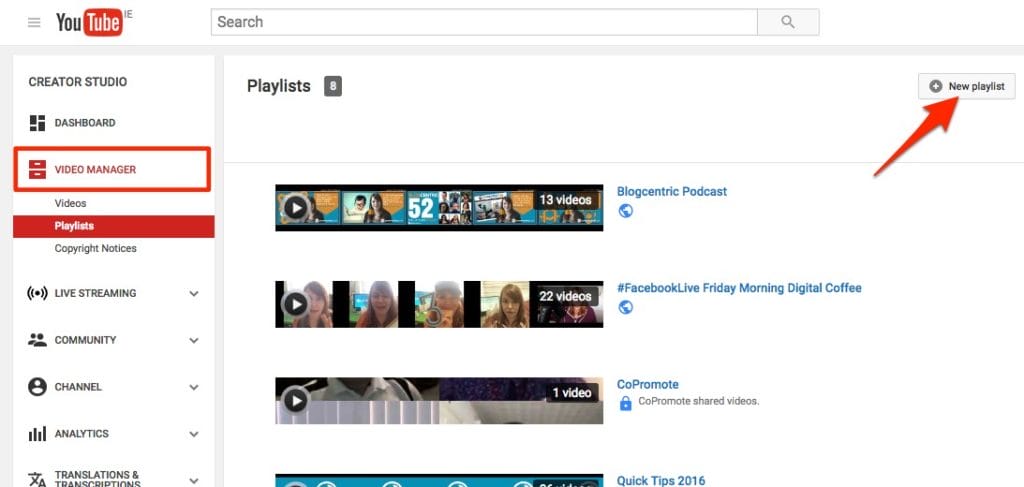
Click ‘New Playlist‘ at the top of the screen and give your Playlist a name
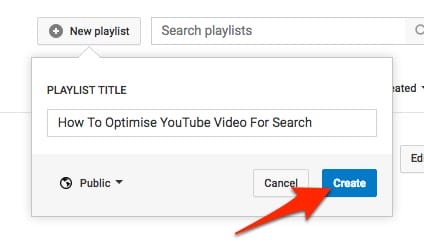
To make your playlist a ‘series playlist‘ click on ‘settings‘

Check the ‘set as official series for this playlist‘ box.
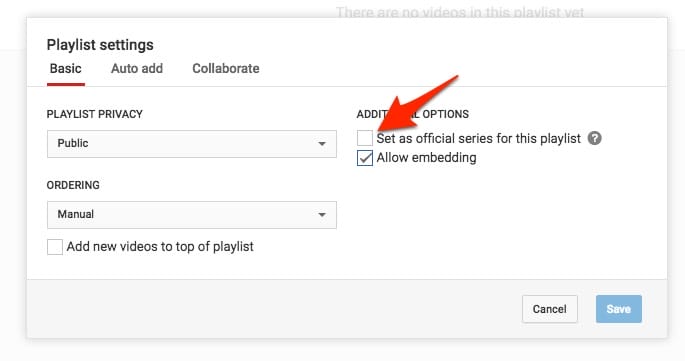
Now you just need to add videos and optimise your playlist.
What have playlists got to do with optimising your videos?
Last week I talked about optimising your videos for keywords and phrases so you’d come up in related videos. You can do almost exactly the same thing with your YouTube playlists.
Optimise your title and your playlist description for keywords and phrases that you want to be found for.
The shorter and more on topic your playlist is the more effective this is going to be.
Don’t delay, try it out. Look at ways you can clump your videos together and optimise your YouTube playlists. See if you get an increase in views as a result.
Get a headstart on Google Analytics 4 & understand the lingo with the GA4 phrase book