• Skip to primary navigation
  • Skip to main content
  • Skip to primary sidebar
  • Skip to footer

Amanda Webb Spiderworking - Google Analytics Setup and Training | Digital Marketing Measurement Support

Your Friendly Google Analytics Geek | Taming GA4 One Report at a Time

  • Tel: 085 113 7542
  • Home
  • About
  • Work With Me
    • Google Analytics Done-for-you
    • Training & Mentoring
  • Speaking
  • Blog
  • Get In Touch
You are here: Home / Facebook / Facebook Advertising: How To Set Up A Website Conversions Ad

Facebook Advertising: How To Set Up A Website Conversions Ad

January 21, 2014 by Amanda Webb

Share
Tweet
Share
Pin
Email
WhatsApp

One of the best types of Facebook advertising is ‘Conversion tracking’. This allows you to optimise your ads for people who take a specific action on your website.

You might want Facebook users to fill in a form, join your mailing list or buy a specific product. The beauty of this is that Facebook will target these ads at people that it knows have taken these actions in the past, people who have bought products or signed up to mailing lists as a result of a Facebook ad.

To measure conversions you need to set up a tracking pixel within Facebook and add it to the <head> </head> section of the specific page on your site that you want to track.  This could be the thank you for buying from us page, the thanks for subscribing or perhaps a specific landing page you have hidden on the site. In this video I have set up a tracking pixel for a download page on the We Teach Social website.

It can be a little bit tricky to set up a tracking pixel. In the example I show setting up an ad for We Teach Social, we use the Genesis Framework for our website and this gives us the opportunity to add code to the header of individual pages on WordPress. All we have to do is scroll down below the post or page we are creating and there is a box in which we add the code.  See below:
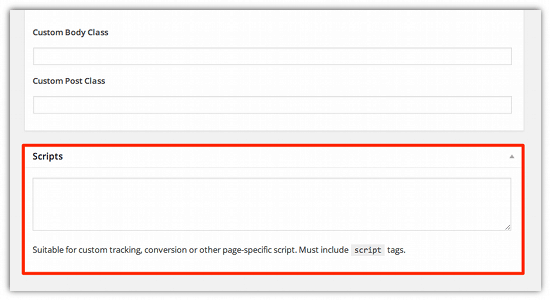
If you are using WordPress but not the Genesis framework you can try the ‘Per Page Add To Head‘ plugin that essentially does the same thing.

If you aren’t using WordPress or don’t feel comfortable messing with the code on your site you can either forward the code to your developer or you can use a regular website ad and use your own tracking code. You will loose the benefit of Facebook targeting the most likely punters but you will still be able to measure conversions in Google analytics. See ‘Find Out Which Facebook Ads Are Working Best with Google Analytics URL Builder‘.

Do you want to learn more about using Facebook advertising for your business? Sign up to the We Teach Social Facebook Advertising online course that I’m training this Spring.

Related Posts:

  • cro-for-low-traffic-websites-Usman-Qureshi
    Optimising Low-Traffic Websites: Practical CRO Tips…
  • Comic-book style image of a woman in glasses and a chef hat stirring a bowl labelled “Analytics” while her orange cat, also in a chef hat, holds a whisk. Recipe ingredients like “Traffic,” “Conversions,” “Reports,” and “Insights” float around them like a cartoon brainstorm. Bright orange and blue colours, vintage halftone texture, and slightly puzzled expressions complete the analytics cooking chaos.
    Using Google Analytics to Improve Marketing ROI: The…
  • optimising-user-experience-with-rebeca-
    How to Improve User Experience with Analytics:…
  • google-analytics-for-ecommerce-fred-pike
    Google Analytics 4 for E-Commerce: Fred Pike’s…
Share
Tweet
Share
Pin
Email
WhatsApp

Filed Under: Facebook, Facebook Advertising, Video Tagged With: ads, Facebook advertising, tracking pixel, website conversions

Primary Sidebar

Work With Me

From Google Analytics Training to the ROI Escalator Programme. Find out how I will help you get more ROI for your business

Amanda, smiling with red hair draped over her shoulders. You can trust her (but I would say that wouldn't I)

Get ROI Help Straight To Your Inbox

Get daily tips and inspiration on how improve your digital marketing ROI using analytics

Privacy Policy

Let's Connect

let's connect on LinkedIn Subscribe on YouTube Follow on Facebook

Footer

Google Analytics Certified
Very Blog Awards Winner
Social Media Examiner Winner
Social Agency Scout
  • Done For Your Google Analytics 4 Packages
  • Training & Mentoring
  • Speaking
  • That Analytics Podcast – Learn to love your stats
  • FREE Webinar: Finding the Gold in Your Google Analytics
  • Get In Touch

© Copyright 2017-2024 Spiderworking.com - Social Media For Small Business · All Rights Reserved · Privacy Policy · Cookie Policy · Maintained by FlyingFish.ie

