
When you’re starting out on twitter the language and codes used can be quite confusing. Twitter in some ways has it’s own language, some of which you can only pick up by being part of it. Some of which is easy to explain. To help get you started here are three of the basics:
@
@ is the symbol that proceeds a username for example @spiderworking. When you are replying to another user or mentioning them in a tweet use the @ before their name to indicate they are a twitter user and to notify them that the comment is directed at them. For example:
”@stephenfry please don’t leave twitter we’d miss you immensely”
”I hope @stephenfry doesn’t leave twitter’
You can see who has been mentioning you by clicking @yourusername on the right hand side of your screen.
RT – Retweet
RT is a ‘ReTweet’ or a copy of a tweet that someone else has posted. It assigns credit to the original poster.
A retweet starts with: RT @(name of user you are copying) and then the tweet. For example:
“RT @hamperlady Wanna shop Irish for Christmas this year? Check out this new site: http://short.ie/42jn9f supporting small Irish business”
You can also ask others to RT something you have posted by adding “please RT” at the end of your message. This can prove to be surprisingly effective.
# hash tag.
A #(hash tag) is the way people mark the subject they are talking about so it is searchable. Although a word doesn’t need a hashtag to be searchable it’s a great way to promote a particular cause or to suggest to others to start using it.
It also means that if you are a searching a word that has more than one meaning you can eliminate the words that are irrelevant. For example if you search for ‘Organic’ you will find a lot of people talking about organic listings on google or organic chemistry. If you search for #organic you will find posts specifically about organic food.
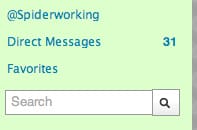
To see how a hash tag works try typing #xfactor into the search box on the right hand side of your twitter page (see below), click the magnifying glass and you will be presented with a list of tweets about the X Factor. This can be good fun when you are watching a television show, following the hash tag and using it yourself can make you feel as if you are watching it with thousands of other people, and virtually… you are!
Hash tags that have been used to promote specific causes include #welovethenhs, #iranelection, #breastcancerawareness. They can also be used to promote something within your industry. I have given you the example of #organic above but find a tag that could be relevant to what you do. eg #christmasgifts, #interiordesign etc.
You can also create your own hashtag if you can’t find one specific to you.
For example Irish online advertising and internet marketing agency Onlineadvertising.ie has been doing some research into the busiest day of the year for online shopping in Ireland. They have christened the day itself Cyber-Sunday. By creating and using a hash tag #cybersunday their report and their phrase has the potential of going viral .
We’ll be back soon with some more examples of how to speak twitter.





