I used to upload all my videocasts both to Facebook and Youbube but changed strategy towards the end of last year. The reason? I have found the inbuilt Facebook video app frustrating. It can take ages to upload videos and then they seem to disappear only to re-appear a day or two later. It was this that pushed my decision to upload to YouTube only and link to it from my Facebook page. The videos can still be watched directly on Facebook and I’ve cut the time it takes to load by half.
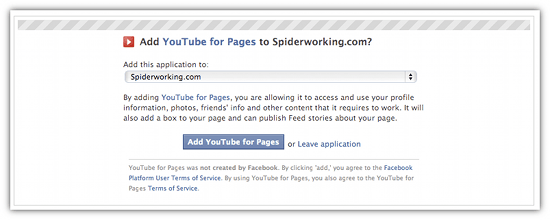
The disadvantage is that those who visited my Facebook page and wanted to watch videos from the archive could only access those I’d posted directly to Facebook. The video tab displayed the old ones but the new ones, linked from YouTube were not easy to find. YouTube for Pages from Involver solves this problem by allowing you to add a YouTube tab to your Facebook page. Here’s how it works.
Follow this link and choose which of the Facebook pages you manage that you want to add your YouTube tab to. You will need to give the application some permissions to access your Facebook account & you will need to provide some basic information to Involver if this is the first time you have installed one of their apps.
Next add your YouTube username and choose some options for your page. Do you want to include videos you favourite as well as those you upload? Do you want to allow comments? Do you want to display related videos? Most importantly do you want to allow the app to autopost your uploads to your Facebook Timeline? I don’t recommend this option as posting manually allows you to add your own blurb and encourage more interaction.
Once you have saved your changes here a YouTube tab will be added to your page. The good news is that this app is fully optimised for Timeline and occupies the full tab width. Here’s what mine looks like.
As long term readers of my blog will know I’ve been videocasting for over 2 years now. A recent look at my YouTube stats tells me that the majority of my viewers are Men between 40-60 based in the USA. Not exactly my target market but I know from customers and friends that there are enough people in Ireland watching them to still be of benefit to me. I’ve also gained new customers and leads through my videocast and now when I go to a big networking event at least one person always recognises me from my videos, this makes it a lot easier to break the ice.
I was delighted to spot two Irish businesses videocasting in 2012.
Dee Sewell from Greensideup created her first video on her phone and edited on Windows Movie Maker, this proves that almost anyone can make a video, you no longer need fancy equipment now you can shoot and even edit on your phone.
So if you’re inspired to get video blogging in 2012 Here’s my tips for getting started on the right foot
Shoot Landscape
Always shoot video landscape, so that the frame resembles your TV screen. There are so many devices you can shoot video on now that the traditional landscape frame seems to be abandoned by some. Portrait videos are appearing on my Facebook stream and although this is fine for personal posts for business we need to conform to the current norm.
Keep it short
The attention span of YouTube viewers is notoriously short so it’s important to keep your videos short and to the point. I try to keep mine under three minutes (but often fail). If it’s longer you need to be able to keep it compelling throughout. There is a fascinating matrix on your YouTube analytics that shows you ‘audience retention’ it allows you to see on average how long people watch your video for.
Framing
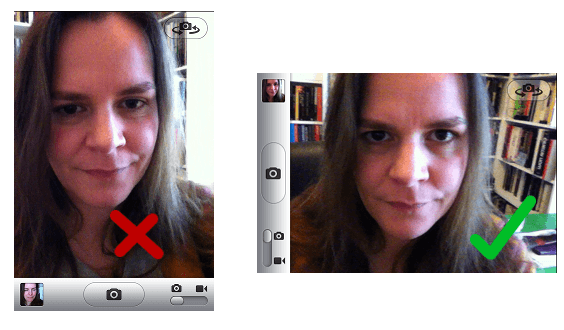
Think about the framing of your shots. I found this handy guide to framing shots for all occasions. Although it refers to photography it is just as relevant for video. If you are filming yourself make sure you are framed properly, that you have the top of your head in shot but not too much space above your head. See the examples below.
If you want to include something else in the frame; a banner or something that symbolises your business make sure it’s fully visible in the shot. Check that it doesn’t look like something is growing out of your head or arm as this can prove distracting to your audience.
Start Small
If you’re not ready for a full length video yet try shooting some quick tips and uploading them to Tout. I’ve just started using this for my weekly ‘Twitter Tip’. You can only post 15 second updates so it’s good practice at being concise. You can shoot them straight from your phone and if editing is required it’s generally just to top and tail the shot. I’ve been using iMovie for iPhone to edit and there are a number of Android apps that are just as good. VidTrim Pro gets good reviews. If you are using a good Android app for video editing do let me know.
Look Directly At The Camera
The lens of the camera is your audience so it’s important to make eye contact with it. Make sure you look directly down the barrel of the lens when addressing your audience. Eye contact will help you hold your viewers attention the same way it would in real life. When setting up your shot try and position your camera at eye level so that you are neither looking up or down at your audience.
Don’t be vein!
It can be one of the hardest things to see yourself on video and hear your own voice recorded. Recording video on a regular basis will help you cure this. Record yourself every day for around a minute and play it back just to get used to the process. Don’t obsess about the way you look.
Tony Blackburn smile
BBC Radio 1 DJ Tony Blackburn once said that he always smiled when he talked on the radio and this smile would translate into his voice. This is (obviously) even more relevant when making video. You don’t need a Cheshire Cat style grin but a smile will help you connect with your audience in a way a frown never will.
Re Take
I think it took me around 30 takes to get my first video right. I manage it a lot quicker these days but as my Christmas gag reel will tell you it sometimes still takes me a good few goes to get it right. Don’t worry if it takes you a long time to get it right, be strict with yourself, if you stumble over a word or get something wrong, start again!
Uploading to YouTube
I could write a whole blog post on optimising your videos for YouTube, but many people already have. But here are the basics
Title – Give your video a strong and compelling title explaining exactly what it’s about. ’How To’ or ’10 ways to’ videos seem to get the best views for me but as long as the title is enticing people will be interested enough to click play.
Description – If you want viewers to visit your website make sure you add your web address (including the http://) into the description box. Write a short synopsis of the video underneath this.
Tags – Use relevant tags to notify YouTube users what your video is about. The relevance is important as you want to attract users who are looking for your video. Attracting the wrong viewers will just result in viewer drop off early on in your video.
Are you video blogging? Do you have any tips I’ve left out?
Ruairí Browne is the Managing Director of Kro IT Solutions Limited; a software development company in Dublin. He has over 12 years’ experience working in web technologies and he counts some very well-known companies as his clients. In this guest blog post for Spiderworking,com he examines the part a traditional website has to play in the age of social media.
I have noticed an increasing number of businesses operating from social media only and eschewing a traditional website. It is not something I am against in principle – actually I think a good social media presence is a lot more useful and cost effective than a bad website. It is also technically very feasible – you can sell products directly from Facebook now with no major setup costs. However for serious business owners here are some reasons why I believe you should keep a website as the central hub of your online activity.
1) Watch the T&Cs
Facebook, Google Plus, and Twitter all have seemingly daft rules about competitions, promotion, and other aspects of being a respectable user of their site. If you break these rules you will often be banned without warning or any right to state your case. By using social media as a channel to send users back to your website where they can then enter competitions or purchase deals you are ensuring that you do not fall foul of these rules. You may also consider that some websites such as those related to breast feeding or alcohol may fall foul of American prudence on those subjects that would not be applicable in Ireland.
2) Fashions Change
A well-known Irish band that I worked with spent a lot of money on a social media campaign to launch themselves on MySpace and Bebo. They also had a website which could be maintained, managed, and edited by the band themselves. However they never really took to the website and decided to run all their promotions and competitions exclusively through social media. At one point they had a major fan base of over 100,000. I asked them once if they had email addresses for all these fans and they laughed at me and told me email was old school (man). That was all very well until all their fans moved to Facebook and they had to start again back at zero. If they had driven even a proportion of their traffic back to their website they could have captured their fans contact details there and when the band moved to Facebook they would at least have been able to inform people. As it happens the change in fashion more or less finished the band because the second time around they had all left their jobs and could not sustain a second long campaign back to popularity. I am not sure that Facebook is about to follow Bebo down the drain, but if it does (and let’s face it Google Plus would like it to) then are you ready to move with it? Also imagine that one day you wake up and all your followers are gone from your Facebook page due to some glitch. It could happen and if it does Facebook will issue a brief statement saying that some customers were affected and there is nothing we can do about it.
3) Information is Powerful
Facebook, Twitter, Youtube, and Google Plus are all great places to interact with your customers. However your website is owned by you and therefore a “hit” to your website is of great value to you. For starters you are on message right across the screen – you are not sharing your screen space with messages from the social media website or advertisements or anything else. Secondly you are capturing user data such as where they came from, what country they are in, what keywords they used to find you, etc. You essentially have control of the customer and it is up to you to lose them or make the sale. The same cannot be said with Facebook (or similar) where your customer is really Facebook’s customer and you have to compete for their attention. People picture Facebook as like a big shopping mall that attracts millions of visitors and allows you the privilege of selling to them. However remember that reality is that we are attracting millions of visitors to Facebook and then they are the ones that are trying to sell to those visitors. Think of the Arab guy in the market in Morocco. He comes out into the street with a monkey on his shoulder to attract attention and he tries to make you feel special by telling you he is Irish and his wife is Irish and his dog is Irish. All the time he is pushing you into his store. He knows that the market is a dangerous and fickle place where everyone wants a bit of you. If he can get you into his shop he has your undivided attention to try and make a sale. Facebook is like that market and you need to get people back to your website where you can get their undivided attention.
4) Credibility
Users are not stupid. They know a Facebook page takes 3 minutes to create and that you can get 100 fans just by asking your friends. A website shows much more commitment. A website says that if I have a problem this person will still be here in a few months. This may not be accurate but it is going to be a factor in your customers mind. When e-commerce first took off the most successful shops were those with a brick and mortar presence backing them. Nowadays people expect that a social media presence will at least be backed by a website and if that in turn is backed up by a bricks and mortar operation then all the better.
5) Value
Finally a web based business is worth money and can be sold. For all the reasons above and many more a business based solely on social media is of no value to an investor, bank manager, or buyer. Social media is also perceived [appropriately] to be about people. It is very rare that a small business has an effective social media presence that is not in reality based on one or two key personalities. Having a website behind your social media presence gives it a focus and a focal point that will make it easier for other personalities to take your place and continue to run your business.
You don’t have to look too far to see an example of a business run in the way I recommend. Spiderworking.com is a strong brand tied together by a good website. However Amanda is herself a brand on social media but she tends to filter most of her potential customers back to the Spiderworking.com website (after all where are you reading this blog post?). She is embracing social media fully but she is using it to strengthen and nourish her core business rather than as an end in itself.
I always picture a website as the trunk of a big solid oak tree. Social media is like a part of the root and branch system – it brings nourishment to the website and it allows the website to express itself. If a tree loses a branch or a root it will not die, but without many of them it will not live. There are many other roots and branches such as email, cold calling, marketing, advertising, and networking. They are all important but I suspect that right now social media is for a lot of businesses the one to concentrate on. Just don’t forget the basics – you need a good solid place to call home.
I’ve found videocasting a really useful way to share information and tips with my social media community. It is easy for me to direct a customer to a video on how to do something if I get stuck and it also draws people into my website and Facebook page. It is my belief that there are lots of businesses out there that can benefit from videocasting, if you are brave enough to sit in front of a camera it’s worth giving it a shot.
If I’ve managed to convince you and are itching to get started here are some tools for shooting and editing your video and some quick tips on how to prepare yourself for the camera.
Hardware
You will need:
A webcam, camcorder, digital camera with video facility or a smart phone.
A microphone (for your computer).
Software
Screencasting - Record what’s going on on your computer screen
Jing Pro – I find this really easy to use, you can record mute or with a voiceover and save both to your computer and to the cloud. The pro version is a must as it gives you file formats that are compatible with most editing. For only $14.95 a year it’s a bargin.
Camtasia – From Techsmith, the same company as Jing this is a more complete solution and this is reflected in the price. As well as screencasting it offers editing, visual effects and more. If your serious about videocasting this has to be the tool for you. Still well priced at $99 dollars (for mac) and $299 (for windows) with a free 30 day trial.
Editing
There are plenty of free tools out there for editing.
iMovie – If you have a mac, an iPhone or a iPad. iMovie is a really easy to use editing application. We’ve not tried the mobile version yet but the full version allows you to add attractive captions, images, as well as music and voice-over. It’s simple and user friendly.
Movie Maker - Those running windows can use Movie Maker, again it’s simple to use if a bit clunky compared to iMovie.
YouTube - You can edit your videos on YouTube. It’s not quite as straightforward as iMovie or Movie Maker but it means you can edit from any computer and you don’t need to worry about file types (YouTube is more forgiving of different file formats) or downloads. I found this excellent tutorial on editing on YouTube:
Broadcasting
YouTube – It’s essential you upload your videocasts to YouTube, it’s the king of online video sites and will almost guarantee a viewership.
TubeMogul – This application allows you to upload your video to one place and then syndicates it to a number of video sharing sites. A massive time saver.
VideoJug – One of many sites that is full of online tutorials. If your videocast is demonstrating how to do something it could be worth adding this to your places to broadcast.
Facebook – Don’t forget to add your videos to Facebook, uploading them directly to your business page makes them very easy to share within Facebook. It’s harder to keep tabs on views but they are great for getting comments and interaction and carry more edgerank (as far as I can gather) than a link.
Prepare Yourself
1. Forget about the way you look. This doesn’t mean you shouldn’t comb your hair but don’t focus too much on the way you look. Most of us are self critical and staring at a walking talking image of ourselves can be quite disconcerting. I always tell myself that in 20 years time I’ll look back at my videos and think how young and healthy I looked.
2. Don’t read from a script. You must learn your script before talking to camera, reading it will mean looking away from the camera and distracting your audience, it can also make you sound quite wooden.
3. Treat the camera as a person. Look straight into the lens of the camera, this is like making eye contact with a person so it’s really important. It also avoids you looking at yourself when you are recording so you don’t get distracted by the way you look.
4. Practice. I record all my rehersals in case I get it right the first time. In reality this is less likely to happen, the first may take 20 – 30 takes but as you make more videos you will find yourself doing it in 3 or 4.
5. Be Yourself. Relax and be natural in front of the camera, this way your personality will shine through. You are what makes your videocast different to the rest so don’t be afraid of being yourself.
Have you any tips to add? Are you new to Videocasting and have a question? I’d love to hear your comments and queries in the comments section below.
Oliver Dempsey from Tradesmen.ie got over 14,000 views of his ‘Funny Cow Video‘ on YouTube. The video wasn’t just about getting views, it was designed to help him to get votes for the 02 Ideas room sales pitch competition. He went on to win netting €5,000 worth of prizes. We were delighted to welcome him as guest speaker to this months KLCK Bloggers Network meetup in Portlaoise this month.
Oliver’s enthusiasm is viral in itself. He showed us his videos and talked us through the process of making them, how they evolved to adding sound effects and music and how they became so addictive he even made one when on holiday.
Daisy the cow is his top viewed video and he credits this to the title ‘Funny Cow Video’ the keywords he included and the power of Facebook. It was his Facebook friends that helped it go viral, sharing it with their friends who shared it again. Not only was it a funny video but it was short (1 min), amusing and included bloopers. Other videos that got lots of hits also included ‘funny’ in the title.
The big question is did this campaign bring business to Tradesmen.ie and Oliver believes it has, it has spread the word about the business, leads and even friends have found out more about his business because of the campaign.
Oliver recommends the Flip camera for making simple videos and the free Movie Maker software for windows for editing. If your on a Mac iMovie is good too. He also recommends investing in a good tripod and credits much of his success to Daniel Beere his Intern, camera man and quality controller. Working without him has been more challenging. I’m pretty sure we’re going to see some more video coming from members of KLCK in the future. I might even try and do something a bit more creative myself soon.
RSS Feeds and converting WordPress.com to WordPress.org
Our round table discussion started by talking about RSS feeds.
What is a RSS Feed?
RSS or ‘Really Simple Syndication’ often called a ‘Feed’ is, in simple terms, a link that is attached to a website that has regularly updated content (blogs etc). This link can be used to distribute content to other sites. Doing this allows sites like Facebook, Twitter, Linkedin etc to automatically post your blog content when you add a new post. Users are also able to subscribe to your feed using tools like Google Reader. This means that instead of having to visit your site to check out if you have posted recently they can check their reader for updates from all the blogs they follow. It’s a great tool for both keeping up with blogs and sharing your own content.
How do you find your RSS feed?
There are lots of ways of finding an RSS feed, some sites publish a link on their sidebar or at the bottom of a page. My personal recommendation is to use Firefox to surf the web.
When you are on a site that contains an RSS feed a little symbol appears in the address bar.
If you click this it will display the RSS address rather than the web address and you can cut and paste this into any RSS reader.
WordPress.com & Blogger v WordPress.org
A common topic at KLCK is what blogging platform to use. The most common amongst our members are Blogger and WordPress however some people want to move from WordPress.com (hosted by WordPress and with limited customisation options) to WordPress.org (self hosted and fully customisable). Some members were worried about how hard this could be but luckily we had a WordPress expert in our ranks. Beatrice Whelan assured us that it wasn’t that difficult a transition. It is possible to move the whole database of blog posts over from .com to .org and although it would require a small bit of technical knowledge it is quite simple if you have the time to put into it. I found this handy article online that could help the transition.
Next Meeting
The next meeting is in Kilkenny on 14th March 2011 at 7pm. Our guest speaker is Keith Bohanna who will be talking about commenting. How to get more comments and how to comment on other blogs effectively. Keep an eye on the KLCK Bloggers Network Facebook page for more details. We’ll be announcing the venue etc. over the next few days.
Thank you
Finally a big thank you to all the people who made the Portlaoise meeting possible. The Portlaoise Enterprise Centre who opened up their facilities to us. The room was fantastic and they even provide tea and coffee, a big hit with our members! Food was provided by Laois based marketing company Aos Si, I’m still dreaming about the chocolate cake I managed to resist! and of course the members who attended. You can see our meeting blogroll here.
What is puzzling you about Facebook? What confuses you about Twitter? Do Linkedin, Youtube, Flickr or foursquare bewilder you?
Last year we asked you to send us your social media questions however small or large and it was so successful that we thought we’d offer you the opportunity to ask us again.
So tell us what you would like to know, for example:
What size can my profile pic be for my business page in Facebook?
I created a Facebook page but can’t find it – help!
How do I upload a video to YouTube?
How can I get more comments on my Facebook page?
How do I register as a business on foursquare?
Simply leave a question as a comment below, or tweet us @spiderworking. We’ll then answer your questions here on the blog and include links to your website when we do. So what’s keeping you? Ask away
When using social media to market your brand or service it is important to consider the many opportunities to use online video. With websites including YouTube, Google Video, Yahoo and Metacafe to name but a few there is huge potential to get excellent exposure with an online videos for your organisation. When making a video for online use it may be appropriate to make your own production but if you are looking for something a bit more professional we recommend the services of Hedgehog Productions.
I asked Bryan Corden the MD of Hedgehog Productions to tell me a little more about using video for online marketing and here are his comments.
“There has been a huge growth in the use of online video in the last two years as seen by the fact that YouTube now has over one billion visitors every day. Several major corporate organisations are now specifically creating adverts for use online similar to this example by Old Spice “The man you could smell like”. The advantage of a professionally produced video is that it adds creditability to the product or service that you are offering and it can be specifically produced to suit your intended audience.
When making a video the first step is to outline the objectives and goal of the video. Who is the intended audience, what messages do you wish to convey and what action would you like your viewers to take having watched your video. From there you can go on to develop your script and story board before you commence filming. Once your video is created you can host it on your own website and you can host it for free on a huge range of online video sites. You can also optimise your videos so that they are found by Google and other search engine websites.
Once you have produced a video it is worth considering how you will integrate into your existing website. As the home page is normally the most visited page of any website this could be the ideal location or alternative you might create a specific page for your video content. There are a range of players that you can use or you can integrate the videos directly from YouTube and other online video websites. Hedgehog Productions use a TV style player on our website and you can see it in operation here www.hedgehog.ie.
So if you wish to take advantage of video as part of your social medial marketing strategy you can contact Bryan directly by email to bryan@hedgehog.ie.”
Flock is fast becoming my favorite browser. With lots of added features that enable you to keep up with all your social networking, video and photo sharing and email accounts, it means you no longer have to have multiple tabs open. It also means you no longer have to log in and out of accounts.
Flock is a one stop interface for all your social media activities.
Download Flock at: http://www.flock.com/
Flock is fast becoming my favorite browser. With lots of added features that enable you to keep up with all your social networking, video and photo sharing and email accounts, it means you no longer have to have multiple tabs open. It also means you no longer have to log in and out of accounts.
Flock is a one stop interface for all your social media activities.
Video blogging is a great way to increase traffic to your website, and offering value like video tutorials can be an even bigger draw. But how do you record what you are doing on your screen so that you can insert it into your videos?
Last week Amanda investigated a few of the solutions.
Every social media network is different. Twitter, Facebook, Linkedin amongst others are all brilliant in their own way and it is important to understand how each one works so that you can make the most out of them.