October 27, 2010

What is puzzling you about Facebook? What confuses you about Twitter? Do Linkedin, Youtube, Flickr or foursquare bewilder you?
Last year we asked you to send us your social media questions however small or large and it was so successful that we thought we’d offer you the opportunity to ask us again.
So tell us what you would like to know, for example:
- What size can my profile pic be for my business page in Facebook?
- I created a Facebook page but can’t find it – help!
- How do I upload a video to YouTube?
- How can I get more comments on my Facebook page?
- How do I register as a business on foursquare?
Simply leave a question as a comment below, or tweet us @spiderworking. We’ll then answer your questions here on the blog and include links to your website when we do. So what’s keeping you? Ask away
April 14, 2010

This is the last of our series of blog posts answering your social media questions from the recent contest.
Our first question comes from @marketingelves their website is here.
@marketingelves @Spiderworking are there any tools that would allow you to track what’s been said on twitter on a local (Ireland) basis #smq
Twitter have recently introduced geotweeting although not everyone is using it and it’s not 100% accurate. It does mean that you can use Twitter’s in house ‘advanced search‘ to find local users. You can search by town or country.
Not as accurate but still useful is Tweepsearch, enter: location:”your town” into the search box and it will throw up results based on the information users have added to their profile.
Our last question is from @360Dvirtualtour their website is here.
@360Dvirtualtour @spiderworking can fb adverts target specific locations in ireland or must it be ‘ireland’?
Although Facebook does allow you to target by town in other parts of the world it has yet to introduce this for Ireland. The official reason from the Facebook site is:
Unfortunately, our targeting capability internationally is still somewhat limited. Cities may not be available in certain countries due to the small number of users in these locations. Cities will be made available as Facebook traffic in the area increases.
If you have a social media question you would like us to answer leave a comment below or tweet it at us (@spiderworking) including ‘#smq’ in the post.
UPDATE 13th May 2010
Facebook now allows you to target individual towns and cities within Ireland with your ads.
April 7, 2010
Over the last couple of weeks I’ve been asked by people to blog on a couple of things that are really bugging them. So here’s the two top offenders:
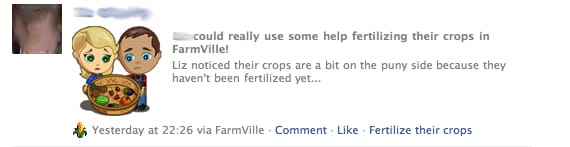
1. Farmville – How to hide it
A common problem. Whether it’s Farmville or Fishville, Mafia Wars or whatever the latest craze is it seems to drive people mad. There is however help at hand, hiding these games from your newsfeed without hiding the friends using them is relatively simple:
- Find a post from one of your friends using Farmville on Facebook:

- Hover your mouse over the top right hand side of the post and ‘Hide’ will appear:

- Click ‘Hide’. Facebook will give you the option of hiding the game or hiding the user. Click ‘Hide Farmville’

- Facebook then confirms your action:

And that’s it, Farmville won’t bug you again!
2. Using Facebook Profile Pages for Business
I’ve blogged about this before but the problem seems to be getting worse and it’s really annoying people. Two people have asked me to blog about it in the last week.
This morning I logged onto facebook and this was what my news feed looked like:

Flooding a newsfeed like can prove an annoyance to people and you run the risk of users hiding your profile altogether. Apart from just being annoying there are other reasons you shouldn’t use a profile page for your business:
1. Visible to the whole world, good for SEO and for encouraging fans.
2. Demographics – Facebook offer some great demographics which mean you can see if you are targetting the right audience with your page.
3. Respect your customers, respect their privacy.
4. Facebook don’t want you to do it… they could close you down.
- A Facebook fan page is visible to the whole world, you don’t need to be a Facebook user or logged in to view it. Because of this it is also visible to search engines, giving you inbound links to your website improving your search engine optimisation.
- Demographics – Facebook offer some great demographics, you can see what age group your fans fall into, whether they are male or female and in what geographical area they live. This means you can see if you are targeting the right audience with your page.
- Respect your customers, respect their privacy. By using a personal profile page for business you are asking friends to share personal information with you but all you offer in return is marketing information. This isn’t a fair exchange and is likely to annoy fans and attach some negative sentiment to your brand.
- Facebook don’t want you to do it, they could close your profile down loosing you your friends in the process.
If your still not convinced look at this profile page that is promoting a business:

This is space that should be devoted to offering valuable content to your customers and enhancing your brand. Yet on a profile page it’s cluttered with irrelevant information.
So if you value your customers and fans please, please, please change to a business fanpage!
At Spiderworking.com we set up business fanpages for customers, offer training, consultation and even Facebook campaign management. Get in touch or call us on 01 442 9410 to find out more.
March 31, 2010

This is the second in our series of blog posts answering your twitter questions from the recent contest.
Our first question comes from Jenny from @jattconsulting more info on them here. (site still under construction)
@Spiderworking How do you run a contest or a poll on facebook?
There are a number of ways of running a poll on Facebook. Which method you use is determined by what sort of results you want. If you are running the poll for research purposes and you want definite answers to your questions I would recommend using one of the applications that has been designed to run on Facebook Pages. Probably the best application currently is “Polls” which is not only the best looking application but it also makes it easy for your fans to see the options.
If however your Poll is just for fun, or designed to create more interaction on your page, using phtographs or the Notes Application can attract more users. One of my favorite Irish Facebook pages Hairy Baby runs polls using Photos on a regular basis. They load a picture or a series of pictures and use the description box to ask the question.

We recently ran a poll on our own page using the notes application and again found it a good way to encourage interaction. Because we weren’t limiting our responses to specific answers we discovered options we hadn’t considered in the original poll.

@EJQ of Eilis J Quinlan & Co. asked:
@Spiderworking. How do you UN -follow someone???
Unfollowing someone is simple.
If you know the username of the twitter user you want to unfollow go to http://www.twitter.com/useryouwanttounfollow – Make sure you are logged into twitter.
On the right hand side of their page you will see a cog symbol:

Choose “unfollow” from the drop down menu.
We’ll be answering more of your Twitter questions next week.
If you like cool social media tools don’t forget to become a fan of Spiderworking.com on Facebook where every Monday we showcase one of our favourite apps.
We’ll be answering more of your Twitter questions next week.
If you like cool social media tools don’t forget to become a fan of Spiderworking.com on Facebook where every Monday we showcase one of our favourite apps.
March 24, 2010

A big thank you to everyone who entered our Twitter competition. The winner of the €50 Spiderworking.com voucher was @OscarBearGrylls.
We will be answering all the questions we were asked over the next few of weeks but here’s two for starters:
Our first question comes from @Madeline from Life Love and Everything.
@Spiderworking How do you know if an event has a twittertag and what that twittertag is?
Twitter tags or hashtags are very organic, some spring up spontaneously, some are created with a specific purpose in mind. Some take off, some trend then die quickly and some never get beyond a few tweets.
Twitter users watching the recent BBC documentary series ‘The Virtual Revolution’ were delighted to see the hashtag for the series appearing at the opening of the show, it was the talk of twitter for most of the programme. Sadly twitter tags are not always as easy to identify. Some events can attract more than one #tag as the recent battle to establish a tag for ‘BBC Question Time’. Both #bbcquestiontime and #bbcqt were being adopted by viewers with most finally settling on #bbcqt, probably because it’s shortness allowed more comment. Although, as far as I can see, the BBC did not create this tag, they have actively adopted it even advertising it on the ‘Qustion Time’ site.
Conferences and events tend to invent their own tags and will often list them on their websites. Some display a twitterfeed screen at the event including the tag. Obviously if you aren’t at the event and they haven’t indicated the tag on their website, it is harder to discover what it is. In this case, searching the twitterfeeds of tweeps you know are attending could help.
There are a few #tag directories, Hashtags.org being perhaps the best, it allows you to either view current trending hashtags or search one of your choice. The result is a list of tweets containing the tag and a graph, showing the tag’s popularity over time. Another directory; TagDef defines #tags, again you can choose from trending tags or input your own. The site offers you a definition of that tag and a list of tweets using it. The definitions are, like Wikipedia, user generated so it is worth comparing them with the twitter stream to confirm the meaning.
Our second question comes from our winner @OscarBearGrylls who asked:
@spiderworking how many companies have used your services to launch them on twitter?
This is a hard question for me to answer as we offer training to groups as well as setting up accounts for individual users so for now that number will have to remain a pretty vague up to 50. We most recently trained a group of Journalists from ‘The Nationalist’ and are looking forward to reading their tweets in the future.
We’ll be answering more of your Twitter questions next week.
If you like cool social media tools don’t forget to become a fan of Spiderworking.com on Facebook where every Monday we showcase one of our favourite apps.
March 10, 2010
 
I was asked by a customer during the week if you could post pictures to twitter. Twitter is text based but it is possible to link to a picture externally. By using a link shortener you can post a link to the photograph on Flickr, Pix.ie, Photobucket etc.
Even simpler are the web based applications that synchronise with your twitter account allowing you to tweet a picture and caption for you. These services also give you an email address that automatically tweets photographs to your twitter stream.
I trialed two of the many applications available for doing this are Twitpic and Twitflog. Both work well. Twitpic is probaby the most common twitter photo service, it’s easy to use, the upload time is short and it is simple to view comments on your photos.
On Twitflog the interface is nicer, once you have synced your accounts the home page mimics your twitter page. I found the upload time to be slower.
Both services are very user friendly and easy to use. On upload time alone I think I prefer Twitpic so here’s a quick rundown of how it works:
- Log into Twitpic using your Twitter username and password.

- Click ‘Upload Photo’ on the top right hand side.

- Click ‘Choose File’ and find the photo you wish to upload on your computer.
- Add the tweet that you would like to accompany your picture.

- Click ‘upload’ and your message will be tweeted.
Here’s one I made earlier:

To email a picture from your phone or email app you will need to make a note of your unique email address. Click the ‘settings’ menu on the top right hand side of your screen to find out what it is. Attach the photograph to your email and add your tweet into the subject line.
Remember to let us know your social media questions no matter how big or small. Leave a comment below with your question.
March 3, 2010

Another big question this week.
Bernard Goldbatch asked
When I introduce mature students to social media, they ask for health warnings. I’d like to read your thoughts on careful engagement online.
This is a good question and one we should all consider before engaging.
If you are embarking on a social media campaign to promote your business it is important to remember that this is ‘Social’ media, simply broadcasting rarely works, you must be willing to become a part of the conversation, to encourage people to actively engage with your brand. This can be quite a scary prospect, by allowing people to participate you are to a certain extent outsourcing the building of your brand. You cannot have complete control of how your audience promotes your business, for this reason I think it is important to spend time in advance of launching your campaign assessing your target market and deciding exactly what sort of message you want to send out via social networks. It is always worth consulting with your marketing department (if you have one) to make sure that your social media strategy fits with the overall marketing strategy for your business. Social media should be part of your marketing mix not separate from it.
I would suggest that you ask yourself 3 questions before you start a campaign, whether it be on Facebook, Twitter or any other online network.
- Who is your target market? Once you have considered this you can keep your posts on message. For example, Spiderworking.com targets micro & small to medium enterprises so we tweet links and information that we believe will benefit this audience.
- How personal do you want to be? Although engagement and conversation is an important part of social media I believe it’s important to keep business pages business orientated. The level of your personality that you want to allow into your Tweets and posts should be decided in advance.
- How will you react if someone attacks your brand? Although we all hope this will not happen to us, engagement through social media means that there is always the potential that a disgruntled customer could voice their complaints online. This doesn’t happen because you use social media, this happens because your customers do. The good news is that because you are already using social media you can react swiftly to rectify the situation. Having a plan on how you will deal with complaints, even if you never need to implement it is very important.
If you have a social media question that you would like us to tackle, leave a comment below.
February 24, 2010

I’ve been asking for your social media question small or large and this weeks one is a biggy!
John Abbot from Abbot Consulting asked:
“would you agree with Gartner’s predictions about Facebook becoming the hub for social network integation by 2012.”
Lets have a closer look at what Gartner predicted:
“By 2012, Facebook will become the hub for social network integration and Web socialization. Through Facebook Connect and other similar mechanisms, Facebook will support and take a leading role in developing the distributed, interoperable social Web. As Facebook continues to grow and outnumber other social networks, this interoperability will become critical to the success and survival of other social networks, communication channels and media sites.”
There is no doubt that by 2012 Facebook will have continued it’s massive growth, maybe even reaching a billion users worldwide. However there is a danger that more users may result in less interaction with the site. It is possible that with so many friends to keep up with that users will be overwhelmed with the information coming in. There is also the danger that people will begin to feel that Facebook is too commercial, they will become fans of too many pages and find their news feeds full of marketing messages. For this reason it is important that page owners keep their posts interesting and relevant to their target audience.
Certainly Facebook are aware of the possible downside of growth and have been quite innovative in the way that they allow their content to be shared. Facebook Connect for example and the opening up of Facebook chat that puts them in strong competiton with other IM solutions. Mobile apps such as ‘Urban Spoon‘ will make the way we interact with our facebook friends very different and it is this move forward, creating a Facebook Profile allowing you to easily share experiences across both the mobile and standard internet, that could give Facebook the ability to become the ‘hub’ Gartner predicts.
In some ways Google Buzz is already attempting to make use of your Google profile in a similar way. By buying into several platforms such as YouTube and Blogger and by allowing you to syndicate these to your email contacts using Buzz there is the potential for Google to become stiff competition to become the ‘hub’ in the future. Whether Buzz succeeds as a social network will not be clear for quite some time. It may even be beyond 2012 before we see it take off in the way Twitter and Facebook has, but I would imagine that Facebook will be keeping a close eye on it’s progress in order to stay one step ahead.
February 17, 2010

“Wondering about the effectiveness of forming a group on Facebook – how do I invite people -is it friends or fans or both? “
Facebook groups are a good way to create a bit of a buzz around your industry. A business should always have a ‘Page’ first but a group is a good way to add value to your brand. They can be a great place for people with a similar interest to share information. For example, it might be worth Lorna starting a group about interior design in Ireland, that way she could keep on top of the current sentiment attached to her industry, share information, start discussions on particular trends all whilst gathering a group of people together who would have an interest in her brand and what she has to offer.
Mashable published a great article on the difference between Groups and Pages recently.
There a couple of things you should consider when you are setting up a group:
- They have a very short shelf life – group pages do not update members news feeds the way that Pages and Profiles do so it can be easy for people to forget about them.
- They are connected to your personal profile. Members of the group will know it is you that is administering the group, unlike a page which appears as an entity on it’s own.
The advantages are:
- You can message members directly. From a business page it is only possible to send ‘updates’ which often remain unread in a fan’s inbox. From a page you can send a message which appears in the inbox the way a personal message does. Be aware not to overload your group members with messages though, use this feature sparingly to avoid people leaving your group.
- If your business already has a page and you are running a new initiative it can be a way to gather together those with a specific interest in it, rather than overloading your fans news feeds with the same message. For example, Spiderworking.com just launched it’s Work The Web Workshops. Imagining that a number of the poeple interested in the workshops would already be fans of Spiderworking.com we decided against setting up a business page. Spiderworking.com’s page will be promoting Work The Web and clogging up fans news feeds with the same recurring message could result in loosing them. For this reason we set up a group. It also means that we will be able to message directly those interested in the workshops.
- People may be more inclined to join a group because they know that a group cannot pollute their news feed.
Inviting people to join a group
You can invite your ‘friends’ directly to join your new group. You cannot invite ‘fans’ of your business page directly but can post details of the group on your wall and ask them to join.
If you have a social media question that you would like answered no matter how large or small leave a comment on this post or tweet us @spiderworking.
February 2, 2010

I asked my twitter followers what questions they had about twitter today and I got two queries immediately. If you have any niggling questions that you would like answers too leave them as a comment on this blog post and I will endeavour to find answers for you.
Q: Can I send tweets to someone without them being public? (from @almagill)
A: You can send a twitter user who is following you a Direct Message which is only viewable by them. There are two ways to do this:
1. From your twitter home page click the ‘Direct Messages’ link on the sidebar:

Use the drop down menu next to ‘Send’ on the top left hand side to choose the twitter user you want to send your message to.

Complete your message in the box provided and click ‘send’ underneath the box on the right hand side.
Remember, you can only send a direct message to someone who is following you.
2. Simply precede your tweet with the letter ‘d’ and the username.
For example:
“d hamperlady did you see the article on social media in the Irish times”
Q: Can I spell check on Twitter? (from @goatsbridge)
If you are using Firefox to browse the internet it has an automatic built in spell check. When a word is underlined in red, simply right click (control click on a mac) on it to get a list of options for the correct spelling.
If you are using Google Chrome follow these instructions in order to enable spell check: http://ow.ly/12yTU
Don’t forget if you have a social media question that you would like us to answer either leave it in the comment box below or tweet it to us @spiderworking.
|