• Skip to primary navigation
  • Skip to main content
  • Skip to primary sidebar
  • Skip to footer

Amanda Webb Spiderworking - Google Analytics Setup and Training | Digital Marketing Measurement Support

Your Friendly Google Analytics Geek | Taming GA4 One Report at a Time

  • Tel: 085 113 7542
  • Home
  • About
  • Work With Me
    • Google Analytics Done-for-you
    • Training & Mentoring
  • Speaking
  • Blog
  • Get In Touch
You are here: Home / Facebook / There’s Something You Need To Know About The New Facebook Page Layout – 1 Minute Moment #61

There’s Something You Need To Know About The New Facebook Page Layout – 1 Minute Moment #61

December 13, 2016 by Amanda Webb

Share
Tweet
Share
Pin
Email
WhatsApp
There's Something You Need To Know About The New Facebook Page Layout
There’s Something You Need To Know About The New Facebook Page Layout

Facebook page layouts change way too often. We’ll just be comfortable with a design and they roll out something new. It’s a bit like when a supermarket changes the layout, it’s disorientating and it can take us a while to find our way around.

Over the last few weeks many Facebook users, myself included have seen a dramatic change in the way content is ordered on our pages, but it’s not just the layout that’s changed.

Watch Below To Find Out More About The Latest Facebook Page Layout Change

New Status Update Box

This appeared for me a long time before the full new templates. The old status update box has been replaced with a simplified version. Post suggestions have been added underneath.
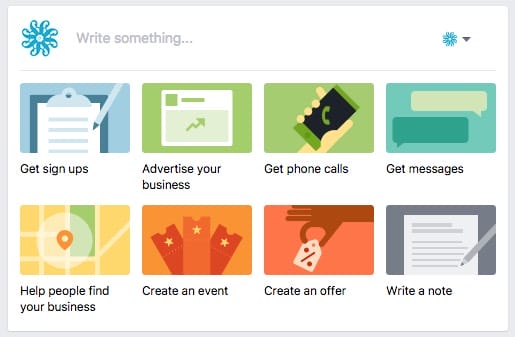
New simplified Facebook status update box

The downside of this new simplified update box is that many of the advanced image options have disappeared from the main page.

If you want to create a carousel, slideshow or canvas you’ll need to do this from the ‘Publishing tab’.

Photo publishing options moved to Publishing tab

Editing The Layout

The new layout demotes your page posts by pushing them further down the page. They are replaced by segments or ‘Templates’ that showcase video, photos, notes, reviews or events depending on the type of page you have.

You do have some control over what appears here. Click on ‘manage tabs’ on the left-hand side of your page and you can choose a different template. However, at the moment you can’t customise your template, you are restricted to those offered by Facebook.
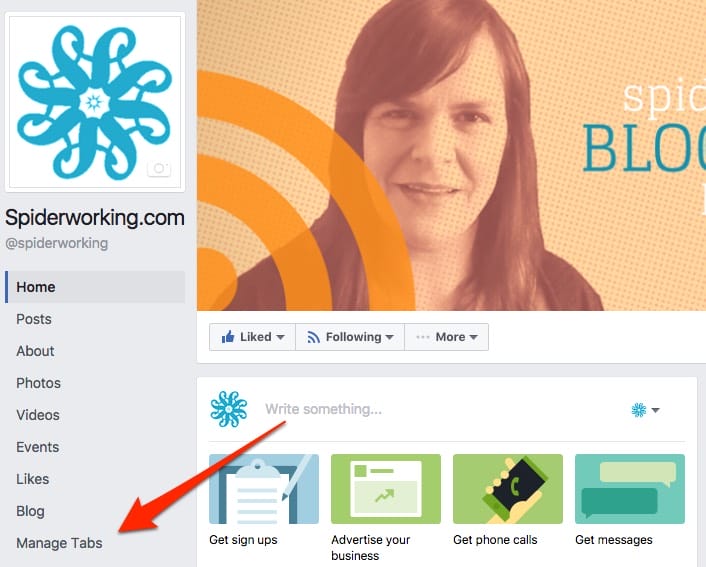
Click manage tabs to change your template

The Something You Need To Know

It was whilst trying to change template on a clients page that I discovered the biggest and most dramatic change to pages.

Only full page admins can make changes to the template. That means that page managers you have added who have second tier access (editors) are restricted to what they can do. Up until now, the restrictions were basic. Page editors couldn’t add or remove admins and couldn’t add apps.

Restricting an editors power isn’t limited to the page layout either. We can no longer access data from lead gen ads even though we’re able to create them.

Why Are Facebook Demoting Page Posts?

Facebook have been restricting reach on posts coming from Facebook pages. The last update to the algorithm hit many business pages hard. Unless you are getting a lot of shares on your posts you’ve probably seen a dramatic drop in your organic reach.

Facebook seems committed to keeping users on site. They don’t really want you leaving. Features like Instant articles and Lead Gen ads are all pushing us to stay within the walls of Facebook longer.

This new page update is helping businesses showcase themselves even if they don’t post regularly, even if their posts don’t reach many people.

Does this signal a move towards pages becoming more websitey? Is Facebook hoping that businesses will abandon their websites for Facebook and keep their users there longer rather than the wider web?

Only time will tell. I think it would be a mistake to abandon our websites but the new pages will certainly compliment our existing online presence.

What Do You Think?

Do you have the new layout? Do you love it or hate it? Let me know below.


Get a headstart on Google Analytics 4 & understand the lingo with the GA4 phrase book


There's Something You Need To Know About The New Facebook Page Layou
There’s Something You Need To Know About The New Facebook Page Layou

Related Posts:

  • A woman with strawberry blonde hair, styled in a bob with bangs, looks surprised and amused as she scrolls endlessly down a very long web page on a laptop. She's wearing a bright orange jacket over a yellow top. Beside the laptop, her calico cat watches the screen with wide eyes and a raised paw. Floating above them are large black question marks and a speech bubble that reads ‘Still scrolling?’ The background is split: the left side is orange with halftone dots, and the right side is blue with halftone dots. The image has a vibrant, playful comic-book feel.
    Are Long Sales Pages Worth It? How to Track What…
  • Amanda a red headed 50 year old woman squints at a yellow measuring tape she has extended
    How to Measure Your Black Friday Campaign Success…
  • optimising-user-experience-with-rebeca-
    How to Improve User Experience with Analytics:…
  • Amanda looking stressed with the Google logo in the background. How does she delete a key event?
    How To Delete Key Events In Google Analytics 4
Share
Tweet
Share
Pin
Email
WhatsApp

Filed Under: Facebook, Video

Primary Sidebar

Work With Me

From Google Analytics Training to the ROI Escalator Programme. Find out how I will help you get more ROI for your business

Amanda, smiling with red hair draped over her shoulders. You can trust her (but I would say that wouldn't I)

Get ROI Help Straight To Your Inbox

Get daily tips and inspiration on how improve your digital marketing ROI using analytics

Privacy Policy

Let's Connect

let's connect on LinkedIn Subscribe on YouTube Follow on Facebook

Footer

Google Analytics Certified
Very Blog Awards Winner
Social Media Examiner Winner
Social Agency Scout
  • Done For Your Google Analytics 4 Packages
  • Training & Mentoring
  • Speaking
  • That Analytics Podcast – Learn to love your stats
  • FREE Webinar: Finding the Gold in Your Google Analytics
  • Get In Touch

© Copyright 2017-2024 Spiderworking.com - Social Media For Small Business · All Rights Reserved · Privacy Policy · Cookie Policy · Maintained by FlyingFish.ie