• Skip to primary navigation
  • Skip to main content
  • Skip to primary sidebar
  • Skip to footer

Amanda Webb Spiderworking - Google Analytics Setup and Training | Digital Marketing Measurement Support

Your Friendly Google Analytics Geek | Taming GA4 One Report at a Time

  • Tel: 085 113 7542
  • Home
  • About
  • Work With Me
    • Google Analytics Done-for-you
    • Training & Mentoring
  • Speaking
  • Blog
  • Get In Touch
You are here: Home / Facebook / Get More Reach With Your Facebook Ads – Use Text Overlay Tool (Was Grid Tool)

Get More Reach With Your Facebook Ads – Use Text Overlay Tool (Was Grid Tool)

January 6, 2014 by Amanda Webb

Share
Tweet
Share
Pin
Email
WhatsApp
Get More Reach With Your Facebook Ads - Use Text Overlay Tool (Was Grid Tool)
Get More Reach With Your Facebook Ads – Use Text Overlay Tool (Was Grid Tool)

[Post updated – 12th August 2016]

The Facebook 20% text rule is gone and that makes ‘Grid Tool’ from Facebook even more useful.

Up until recently Facebook would reject ads that had a text overlay of over 20% text, this was particularly frustrating for small businesses who use ‘Boost post’ a lot. Measuring the 20% was difficult. We’d have to upload our images to ‘Facebook Grid Tool’ and ensure the text didn’t spill into any more than 5 boxes on the grid.

Do Facebook ads make you tear your hair out? Let us manage your Facebook ads for you. We'll save you time and improve results. Get A Quote Now.
“Request

Goodbye 20% text rule

Facebook have relaxed the rules. We can now run ads that have text heavy images, we just won’t reach as many people with them.

This is great news for small business owners. We don’t have graphic designers on tap or available time to edit and re-edit our ad images.

The new standard

The 20% text rule may have been annoying but it was reasonably easy to understand. Now we have a multi-tiered system. Your images are assessed as having one of four levels of text coverage:

1. OK
2. Low
3. Medium
4. High

It’s only when your image is rated high that you could have problems reaching people with your ads.

How much text is high, medium, low or OK?

This is where the confusion starts. Facebook released details in an article on their site but the system seems to be glitchy. I’ve had warnings about heavy text usage on ads that had little or no text overlays.

Facebook grid tool (now text overlay tool)

Facebook grid tool/text overlay is a good way to check our images before we set up our ads. So before you set up your boost post ad check your images.

Here’s how Facebook’s text overlay tool works:

I tried an image I used on a recent boosted post to see how it fared in the new system.

Go to the ‘Facebook Text Overlay Tool’ webpage and upload your image.
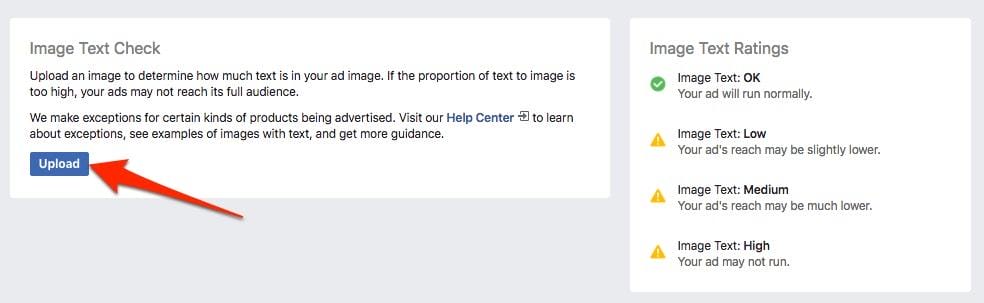
Upload your images to Text Overlay (grid) tool

Once uploaded you’ll get a ranking for your image. As you can see I go the ‘OK’ ranking even though there’s quite a bit of text.

grid tool 20% text
This has more than 20% text yet ranks as OK

I tried another, this time a square picture that I use to promote my Facebook Live events, there’s quite a bit of text overlay. This one got a ‘Low’ ranking.
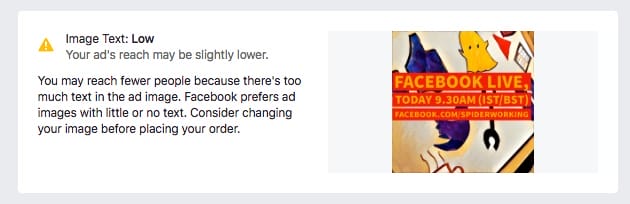
text overlay grid tool results
This one ranks as low

What’s interesting is that both of those images would have failed the old 20% text rule. They also have more text on them than those in Facebook’s own guide.

It seems that there is still some work to be done at Facebook’s end on text recognition. For now I’d still recommend passing images through the grid tool to save time and inconvenience if Facebook rank your images as ‘Heavy’ text.


Get a headstart on Google Analytics 4 & understand the lingo with the GA4 phrase book


Get More Reach With Your Facebook Ads - Use Text Overlay Tool (Was Grid Tool)
Get More Reach With Your Facebook Ads – Use Text Overlay Tool (Was Grid Tool)

Related Posts:

  • facebook-google-up-a-tree
    How to Import Meta Ads Cost Data into GA4
  • the-tiktok-ban
    Is the US Really Banning TikTok? - Digital Marketing…
  • Two middle aged, although they don't look it, white women. Louise has brown short hair and is very smiley. Amanda peers over the top of her glasses in what she assumes is an amusing way, she has long blonde hair.
    How to Build Your LinkedIn Strategy: Insights from…
  • google-analytics-alternatives
    Google Analytics Alternatives: Simple Tools for…
Share
Tweet
Share
Pin
Email
WhatsApp

Filed Under: Facebook, Facebook Advertising, tools Tagged With: 20% text rule, App, boost post, Facebook advertising, promoted post, tool

Primary Sidebar

Work With Me

From Google Analytics Training to the ROI Escalator Programme. Find out how I will help you get more ROI for your business

Amanda, smiling with red hair draped over her shoulders. You can trust her (but I would say that wouldn't I)

Get ROI Help Straight To Your Inbox

Get daily tips and inspiration on how improve your digital marketing ROI using analytics

Privacy Policy

Let's Connect

let's connect on LinkedIn Subscribe on YouTube Follow on Facebook

Footer

Google Analytics Certified
Very Blog Awards Winner
Social Media Examiner Winner
Social Agency Scout
  • Done For Your Google Analytics 4 Packages
  • Training & Mentoring
  • Speaking
  • That Analytics Podcast – Learn to love your stats
  • FREE Webinar: Finding the Gold in Your Google Analytics
  • Get In Touch

© Copyright 2017-2024 Spiderworking.com - Social Media For Small Business · All Rights Reserved · Privacy Policy · Cookie Policy · Maintained by FlyingFish.ie