• Skip to primary navigation
  • Skip to main content
  • Skip to primary sidebar
  • Skip to footer

Amanda Webb Spiderworking - Google Analytics Setup and Training | Digital Marketing Measurement Support

Your Friendly Google Analytics Geek | Taming GA4 One Report at a Time

  • Tel: 085 113 7542
  • Home
  • About
  • Work With Me
    • Google Analytics Done-for-you
    • Training & Mentoring
  • Speaking
  • Blog
  • Get In Touch
You are here: Home / tools / ReTweet The Old Fashioned Way With Classic ReTweet – Cool Tool

ReTweet The Old Fashioned Way With Classic ReTweet – Cool Tool

May 20, 2013 by Amanda Webb

Share
Tweet
Share
Pin
Email
WhatsApp

ReTweet The Old Fashioned Way With Classic ReTweet - Cool Tool

I still feel that I was quite late to find Twitter, it’s something that I put off for a long time but as soon as I joined I was hooked.  It’s still possibly my favorite network, I love scrolling through it, getting into conversations and discovering great content on it.

When I started on Twitter users still had to do the really long winded RT method. We had to physically copy and paste a tweet and type RT @username before the content. It seems like hard work now that we can just click the RT button underneath a tweet.

There were however some great advantages both for the user and the original tweeter to the old fashioned method. So much so that when I use Hootsuite I have it set to send my RT’s automatically in that format.

1. When you send a ReTweet via the old fashioned method your followers are going to be more interested in it. They choose to follow you because you share good stuff, when they see a link from you, with your name and picture next to it they are more likely to pay attention than if it comes from a stranger. If someone uses the old method to share your content you will usually get more click throughs than via the new method.

ReTweet The Old Fashioned Way With Classic ReTweet - Cool Tool

2. The person you are RTing will be aware that you have shared their tweet. When you write a popular tweet that gets shared over and over again it’s easy to loose track of who has shared it. If you share the old way the RT will appear in the @ replies of the original tweeter, they will be less likely to miss that you have shared.

3. You can add your own comment to the end of the RT, telling users why you are sharing it and personalising it.

On mobile devices we already have a version of this old RT method ‘Quote tweet’ which essentially does the same thing but on the web there isn’t this option. Even knowing the advantages of the old method it still seems like hard work if you are accessing Twitter via the web  it’s much easier just to click that ‘Retweet button. That’s where this weeks cool tool comes in handy.  It’s a browser plugin that works for both the Firefox and Chrome browsers.

Here’s How It Works

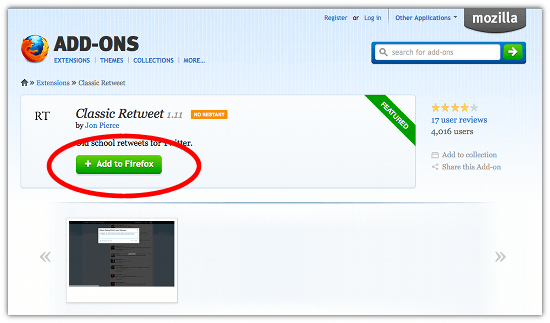
  • Visit the add on page. For Firefox, or for chrome
  • I’m going to be demonstrating the Firefox version
  • Click the ‘add to Firefox button’

ReTweet The Old Fashioned Way With Classic ReTweet - Cool Tool


  • Click install now on the window that pops up
  • It’s as simple as that, it’s now installed.
  • Open Twitter and hover your mouse over the tweet you want to share

ReTweet The Old Fashioned Way With Classic ReTweet - Cool Tool


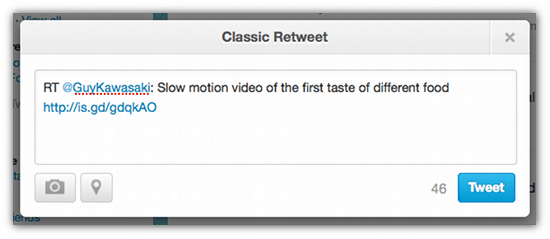
  • Click ‘classic RT’ and a window will pop up showing the tweet
ReTweet The Old Fashioned Way With Classic ReTweet - Cool Tool

  • Just click ‘Tweet’ to send it.

I’m delighted to have found this as although I use Hootsuite for most of my tweets this will prevent my lazy RTing from the web browser.

If you are a Twitter newbie or are nervous of getting started sign up for my A Beginners Guide To Twitter online course starting on 10th of June. More info here.

Related Posts:

  • A woman with strawberry blonde hair, styled in a bob with bangs, looks surprised and amused as she scrolls endlessly down a very long web page on a laptop. She's wearing a bright orange jacket over a yellow top. Beside the laptop, her calico cat watches the screen with wide eyes and a raised paw. Floating above them are large black question marks and a speech bubble that reads ‘Still scrolling?’ The background is split: the left side is orange with halftone dots, and the right side is blue with halftone dots. The image has a vibrant, playful comic-book feel.
    Are Long Sales Pages Worth It? How to Track What…
  • kam-chauhan-measuring-networking-that-analytics-podcast
    Mastering Measurable Networking: How to Track and…
  • Amanda has had a revelation by the looks of things. The words 'Best Website Visitor in GA4' float to the left
    What Google Analytics Metrics Measure Marketing Success?
  • search-console-ga4
    What search terms are people using to find my…
Share
Tweet
Share
Pin
Email
WhatsApp

Filed Under: tools, Twitter Tagged With: App, chrome extension, firefox add on, Oldf Fashioned RT, retweet, RT, tool, Twitter

Primary Sidebar

Work With Me

From Google Analytics Training to the ROI Escalator Programme. Find out how I will help you get more ROI for your business

Amanda, smiling with red hair draped over her shoulders. You can trust her (but I would say that wouldn't I)

Get ROI Help Straight To Your Inbox

Get daily tips and inspiration on how improve your digital marketing ROI using analytics

Privacy Policy

Let's Connect

let's connect on LinkedIn Subscribe on YouTube Follow on Facebook

Footer

Google Analytics Certified
Very Blog Awards Winner
Social Media Examiner Winner
Social Agency Scout
  • Done For Your Google Analytics 4 Packages
  • Training & Mentoring
  • Speaking
  • That Analytics Podcast – Learn to love your stats
  • FREE Webinar: Finding the Gold in Your Google Analytics
  • Get In Touch

© Copyright 2017-2024 Spiderworking.com - Social Media For Small Business · All Rights Reserved · Privacy Policy · Cookie Policy · Maintained by FlyingFish.ie