Last week in part one of this series we looked at how social media can help you research your blog posts. This week we look at how you can find new readers using social media. The key to getting more readers is relationship building, build a valuable community and you will see the return in traffic.
Twitter Search
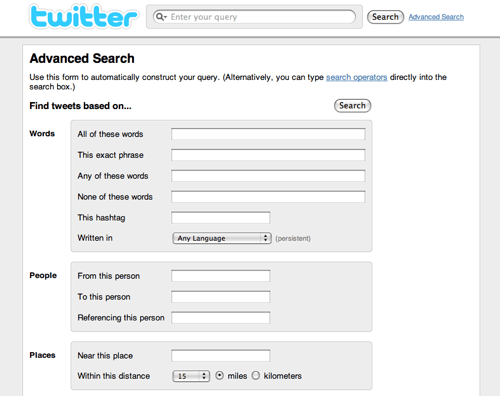
Twitter can be a great source of traffic for your blog, finding the right people to follow, communicate with and share content with will encourage others to share your posts.
But how do you find these people? The built in Twitter search is great for quick searches, specifically the ‘People’ tab in search results enables you to search profiles as well as Tweets making it easy to discover users that are interested in you, your services and industry.
Don’t forget sharing is caring, share and be generous to other people and their content and you will attract them towards what you do.
Advanced Twitter search gives you more options, including geo location and multiple key words. Even better results come with an RSS feed so it’s easy to keep tabs of what is being said. To find out how to use these RSS feeds keep an eye on our Podcast series on how to use them in conjunction with Google Reader.
Even better if you are using Hootsuite you can set up a search column to monitor mentions. This makes it easy to respond to posts in real time.
Twitter Lists
Keeping in mind my mantra ‘Sharing is Caring’ set up some Twitter lists of your favorite Tweeps, those who produce content you are most likely to share. This makes it easy to stay on top of those really important tweets in the river of your timeline.
Commenting

Commenting on other blogs relevant to your industry is a way of raising your profile. Make sure the comments are insightful, a simple ‘great post’ won’t buy you as much karma as a well thought out response. When relevant, and only when relevant it is appropriate to link to a blog post of your own on the same topic. You have to be very careful that this is part of a detailed response as it can look like spam to some bloggers.
Some commenting systems like Disqus above allow users to post their comments to Facebook and Twitter showing that you actively sharing and caring.
Linkedin Answers

We looked at Linkedin Answers last week as a tool for research. It can also be used the same way blog commenting is. Answering a question in full and linking to a relevant blog post within that detailed answer is acceptable. However apply the same rules you would to commenting on blogs, be sure that your answer won’t be interpreted as spam or pure link building.
Linkedin Groups
Posting blog posts to relevant Linkedin discussion groups and asking for feedback, provoking discussion is a fantastic way to gather new readers. Do keep your posts relevant to these groups however as spammy posts can do more damage than good and are often removed by group administrators.
Faceboook
Sharing content from others on Facebook either on your personal profile or business page is a great way to build your community.
Facebook pages now allow you to comment as a business on other business pages, this gives you the opportunity to comment on posts the same way you might comment on a blog. Remember the more insightful your comment is the more likely a user is to click through to your profile and as with all commenting only include a link if it’s relevant to your comment.
Facebook tagging gives you the opportunity to let others know when you are sharing their content and is another important way to build your community. Tagging is a compliment and has the potential to bring traffic into a Facebook page. However only tag when it is relevant. If you are sharing something from their page or their blog it’s great however randomly tagging pages could be interpreted as spam.

Make it easy to share
Adding share buttons such as the Facebook and Twitter to your blog makes it easy for others to quickly share your content on their social media channels. Think about where you want to be shared most and make sure that you include a share button for those networks on your blog. (See ours at the bottom of this post)

Do you have any other tips that bring traffic to your blog? Do you agree that relevancy and sharing and caring are key? I’d love to know your thoughts so leave a comment below.





