
• Skip to primary navigation
  • Skip to main content
  • Skip to primary sidebar
  • Skip to footer

Amanda Webb Spiderworking - Google Analytics Setup and Training | Digital Marketing Measurement Support

Your Friendly Google Analytics Geek | Taming GA4 One Report at a Time

  • Tel: 085 113 7542
  • Home
  • About
  • Work With Me
    • Google Analytics Done-for-you
    • Training & Mentoring
  • Speaking
  • Blog
  • Get In Touch
You are here: Home / Facebook / How Are You Doing On Facebook – Analyse Your Page With LikeAlyzer – Cool Tool

How Are You Doing On Facebook – Analyse Your Page With LikeAlyzer – Cool Tool

February 18, 2013 by Amanda Webb

Share
Tweet
Share
Pin
Email
WhatsApp

likealyzer

Facebook insights are revealing but can be complicated. We can and should spend time pouring over them to determine the effectiveness of our campaigns and it’s important to measure beyond our insights too. Are we getting results from our page?

This weeks cool tool can’t answer these questions but it can give us some hints and tips on how to be more successful with Facebook marketing.  LikeAlyzer can analyse any page, it gives it a score out of 100 and some recommendations on improving on that score.

These tips will help you be more engaging on Facebook but they won’t get you new customers so it’s important to combine a strategy with the recommendations.

I particularly like that I can get any page analysed including those of my competitors, it’s a great way to benchmark your page against others.

Here’s how it works

Go to www.likesalyzer.com

Type the web address of your Facebook page including the http:// into the search box

likealyzer1

Wait whilst LikeAlyzer does it’s thing

The first statistic it gives you is a headline score. This is out of 100

likealyzer2

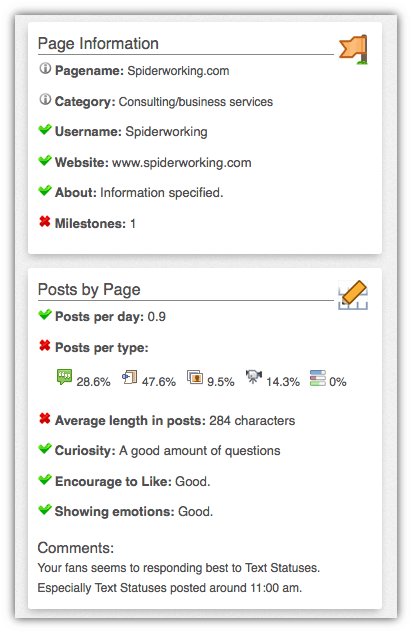
Then it breaks it down further giving you data on post length, response time and more

From this data it offers recommendations. It tells me that the best time of day to post for engagement is 11am and the best type of status update is a Text update.  It recommends I publish more photos, respond to fans questions and comments more quickly, write shorter posts and add more milestones.
likealyzer3

I like this app, although I’ll be taking the results with a pinch of salt and I certainly won’t be abandoning insights, it’s a quick and easy way for me to see how I’m doing.

Did you try this app? What recommendations did it give you?

Hat Tip to Razorcoast for introducing me to this tool.

Related Posts:

  • Using Google Analytics to Improve Marketing ROI: The ACEE System
    Using Google Analytics to Improve Marketing ROI: The…
  • dana-ditomaso-audiences-in-ga4-that-analytics-podcast
    GA4 Audiences: How to Segment and Use Google…
  • Amanda a red headed 50 year old woman squints at a yellow measuring tape she has extended
    How to Measure Your Black Friday Campaign Success…
  • that-analytics-podcast-measure-your-email-marketing-kay-peacey-v3
    Email Marketing Metrics That Matter: A Small Business Guide
Share
Tweet
Share
Pin
Email
WhatsApp

Filed Under: Facebook, tools

Primary Sidebar

Work With Me

From Google Analytics Training to the ROI Escalator Programme. Find out how I will help you get more ROI for your business

Amanda, smiling with red hair draped over her shoulders. You can trust her (but I would say that wouldn't I)

Get ROI Help Straight To Your Inbox

Get daily tips and inspiration on how improve your digital marketing ROI using analytics

Privacy Policy

Let's Connect

let's connect on LinkedIn Subscribe on YouTube Follow on Facebook

Footer

Google Analytics Certified
Very Blog Awards Winner
Social Media Examiner Winner
Social Agency Scout
  • Done For Your Google Analytics 4 Packages
  • Training & Mentoring
  • Speaking
  • That Analytics Podcast – Learn to love your stats
  • FREE Webinar: Finding the Gold in Your Google Analytics
  • Get In Touch

© Copyright 2017-2024 Spiderworking.com - Social Media For Small Business · All Rights Reserved · Privacy Policy · Cookie Policy · Maintained by FlyingFish.ie

