
If like me you follow a massive amount of people on Twitter it can be hard to keep tabs of Tweets on topics that you don’t want to miss. Twitter itself offers us lots of tools to help us mange our feeds, lists have become indispensable for me as have saved advanced searches. I use Hootsuite to manage my Twitter feed and this also gives me lots of options including search and list columns. Tweetdig however does do something a little different with your searches, giving you an easy way to stay on top of news stories, users and more. By creating filters you can easily keep up with the latest news as it breaks. For example this morning there is lots of talk about the Superbowl last night both from a sports perspective and an advertising/social media perspective. If I want to keep tabs on this I can easily create a filter within Tweetdig.
Here’s how it works
- Visit the Tweetdig website and sign up with email address
- Add a Twitter account
- Authorise the app
- Now the fun starts, you will be prompted straight away to create a filter
- It gives you lots of options for filtering; user name, keywords, links, mentions, hashtags, retweets or apps. You can add more than one filter type to the same filter.

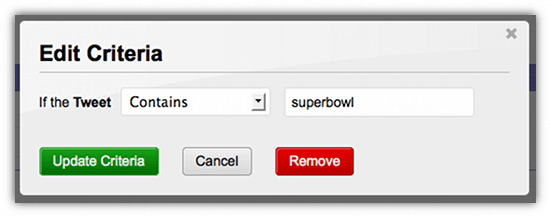
- For me the most useful ones here are #tags and keywords (text), I created one for ‘superbowl’

- You can add multiple criteria to your filter and these can be different types of criteria (@names, #tags etc). You have the option filter specific criteria in or out, meaning that you can create a totally customised feed with only the best stuff in it.
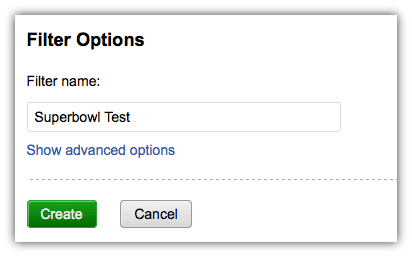
- Now you need to add a name for your filter, this will make it easier to go back and edit afterwards, particularly if you are adding multiple filters.
- To access your filter you can now click on the filter folder on the left hand side of the stream
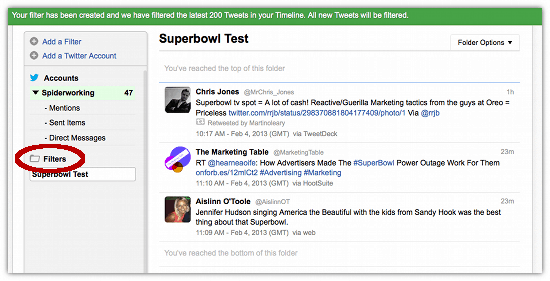
As well as filtering Tweetdig also operates as a full Twitter client you can tweet, retweet and read DM’s and @replies with ease.
I like the idea of creating a customised feed that I can dip into when I need to, I also like the way Tweetdig can be used to keep tabs on a breaking news story without the hassle of saving a search or adding a new column to Hootsuite. I’m not sure I’d use it as my main Twitter client for business just yet but it might be a good option for people who find Hootsuite too complex of for personal users. It will be interesting to see how it develops.
Do you have too much in your Twitter stream? How do you manage it? Would Tweetdig appeal to you? I’d like to hear what you think so do leave me a comment.
If you enjoyed this blog post why not subscribe to my newsletter or my blog posts via email. Click here for more info.





