There are many advantages to re-tweeting, it’s a great way to pass on useful, helpful or even amusing tweets from other users that might interest your followers.
If you follow someone who tweets great content that is interesting to both you and your followers it can be a great way to remind them you are there, if they don’t follow you back yet it could encourage them to do so.
If you are generous with your re-tweets others are more likely to re-tweet you as well, spreading your message accross Twitter.
It is important to think about what you are re-tweeting however, it’s not a good idea to re-tweet a message that is not valuable to your followers as although you may be attracting the attention of the original Tweeter you could be alienating some of your existing followers.
Re-tweeting can be quite confusing as there are two options available. The ‘old fashioned way’ and ‘the new twitter way’. There are advantages and disadvantages to both:
1 Re-tweeting the old fashioned way
The original re-tweet option this can be time consuming when used directly from Twitter on the web. Here’s how to do it.
- Find something you want to re-tweet:

- Copy and paste it into your status update box:

- Before the user name add RT(space)@:

- Send the tweet
The advantage of using this re-tweet method is that the tweet will show up in the @replies of the original tweeter, meaning they will easily see that you have re-tweeted them.
If you are using a client such as Hootsuite to access Twitter, this form of re-tweeting is often integrated into the software making it alot less time consuming and easier.
2 Re-tweeting the Twitter way
A quick and easy way to re-tweet from the web application
- Find something that you would like to re-tweet, hover your mouse over the bottom right hand side of the tweet until the ‘re-tweet’ symbol appears:

- Click the re-tweet button.
- A dialogue box will appear to check that you want to re-tweet the post to all your followers, click yes
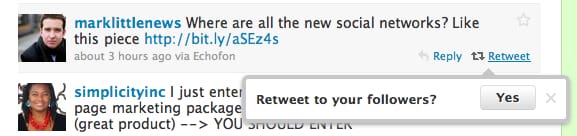
- The tweet will then appear in the streams of all your twitter followers as being re-tweeted by you.

The disadvantage of this is that unless the person you are re-tweeting checks their re-tweets on a regular basis they could miss your tweet. The other disadvantage is that some Twitter clients don’t show this kind of re-tweet in your stream meaning that you could be limiting the audience that the re-tweet will reach.





