• Skip to primary navigation
  • Skip to main content
  • Skip to primary sidebar
  • Skip to footer

Amanda Webb Spiderworking - Google Analytics Setup and Training | Digital Marketing Measurement Support

Your Friendly Google Analytics Geek | Taming GA4 One Report at a Time

  • Tel: 085 113 7542
  • Home
  • About
  • Work With Me
    • Google Analytics Done-for-you
    • Training & Mentoring
  • Speaking
  • Blog
  • Get In Touch
You are here: Home / Events / 4 Social Media Tools for Running Events

4 Social Media Tools for Running Events

June 23, 2010 by Amanda Webb

Share
Tweet
Share
Pin
Email
WhatsApp

You can use social media to both organise, promote and enhance an event.  Over the next 2 weeks our podcast will be showing you how to create events using Facebook and Linkedin.

This week we will show you 4 applications that help you take bookings and help you display tweets at your events and sharing your events presentations.

1. Eventbrite

Eventbrite allows you to set up an event and take payment from attendees.  Once you have created your event it is easy to embed a sign up form into your website or even just a booking button.

eventbrite

2. EventElephant

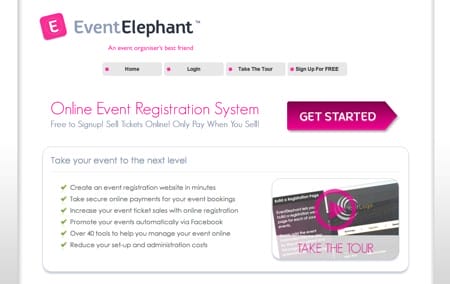
Similar to Eventbrite but with what seem to be far more customisable pages.  EventElephant it’s an Irish company which means customer service will be easier to reach.
eventelephant

3.Twitterfall

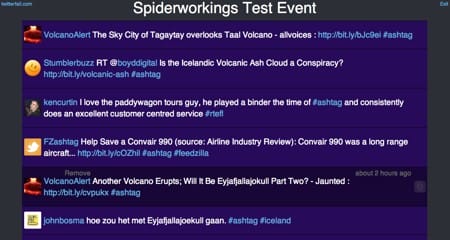
The easy way to set up a tweet wall at your event we’ve talked about Twitterfall before but we can’t find an alternative that we like more so here it is again.  Add your event #tag to the wall and watch the tweets scroll onto your screen.  All you need to do is hook your computer up to a screen or a projector to share the tweets with conference goers.  This encourages more interaction amongst your audience and more online buzz about your event.
Twitterfall

4. Slideshare

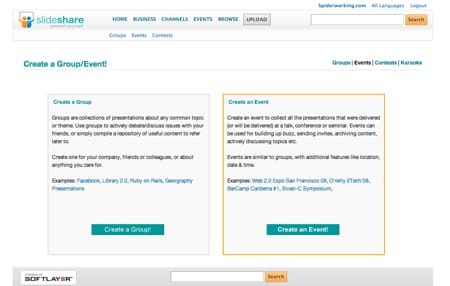
Using Slideshare you can set up a group or an event where all the presentations from the day can easily be shared.  Simply click ‘events’ at the top of the home screen once logged in.  Again this not only makes it easier for attendees to catch up with the presentations it also creates a buzz around your event.
slideshare

Related Posts:

  • Amanda looks cool, I mean she's got shades, she's got a biker jacket. Her hair is red and her skin is white. the text reads 'Custom events - no tag manager'
    4 Simple Google Analytics 4 Custom Events You Can…
  • google-analytics-for-ecommerce-fred-pike
    Google Analytics 4 for E-Commerce: Fred Pike’s…
  • A woman with strawberry blonde hair, styled in a bob with bangs, looks surprised and amused as she scrolls endlessly down a very long web page on a laptop. She's wearing a bright orange jacket over a yellow top. Beside the laptop, her calico cat watches the screen with wide eyes and a raised paw. Floating above them are large black question marks and a speech bubble that reads ‘Still scrolling?’ The background is split: the left side is orange with halftone dots, and the right side is blue with halftone dots. The image has a vibrant, playful comic-book feel.
    Are Long Sales Pages Worth It? How to Track What…
  • Amanda pulls an 'o' face, the words 'who visits your website' float to her right
    Is Your Ideal Customer Visiting Your Website?…
Share
Tweet
Share
Pin
Email
WhatsApp

Filed Under: Events, Twitter Tagged With: applications, Events, Facebook, Linkedin, podcast, promote, slideshare, Social Media, Twitter

Primary Sidebar

Work With Me

From Google Analytics Training to the ROI Escalator Programme. Find out how I will help you get more ROI for your business

Amanda, smiling with red hair draped over her shoulders. You can trust her (but I would say that wouldn't I)

Get ROI Help Straight To Your Inbox

Get daily tips and inspiration on how improve your digital marketing ROI using analytics

Privacy Policy

Let's Connect

let's connect on LinkedIn Subscribe on YouTube Follow on Facebook

Footer

Google Analytics Certified
Very Blog Awards Winner
Social Media Examiner Winner
Social Agency Scout
  • Done For Your Google Analytics 4 Packages
  • Training & Mentoring
  • Speaking
  • That Analytics Podcast – Learn to love your stats
  • FREE Webinar: Finding the Gold in Your Google Analytics
  • Get In Touch

© Copyright 2017-2024 Spiderworking.com - Social Media For Small Business · All Rights Reserved · Privacy Policy · Cookie Policy · Maintained by FlyingFish.ie