
• Skip to primary navigation
  • Skip to main content
  • Skip to primary sidebar
  • Skip to footer

Amanda Webb Spiderworking - Google Analytics Setup and Training | Digital Marketing Measurement Support

Your Friendly Google Analytics Geek | Taming GA4 One Report at a Time

  • Tel: 085 113 7542
  • Home
  • About
  • Work With Me
    • Google Analytics Done-for-you
    • Training & Mentoring
  • Speaking
  • Blog
  • Get In Touch
You are here: Home / tools / Save All Your Open Tabs To A Visual Board With Collectably

Save All Your Open Tabs To A Visual Board With Collectably

February 3, 2014 by Amanda Webb

Share
Tweet
Share
Pin
Email
WhatsApp

Save All Your Open Tabs To A Visual Board With Collectably

How many tabs do you have open on your browser right now? Although since I started using Pocket over a year ago I’ve minimised the tabs I have open I still tend to end up with 6-10 when researching and writing a blog post.

This weeks cool tool is a real time saver, it saves all your currently open tabs to a visual interface where you can access them easily. It’s like Pinterest but without the need to double click and easier to curate, just one click of a button and you can create a board from your open tabs.

The only downside is that you will need to use the ‘Chrome’ browser in order to use it to save all open tabs.

Here’s how it works

Visit the Collectably website and sign up for an account
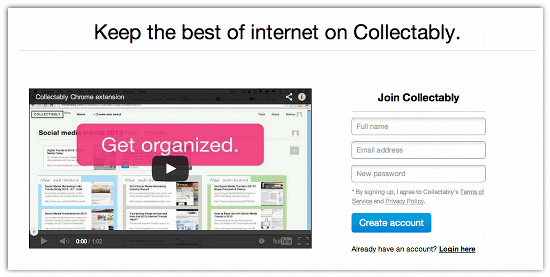
Save All Your Open Tabs To A Visual Board With Collectably

Click on ‘tools’ on the top right hand side of the page
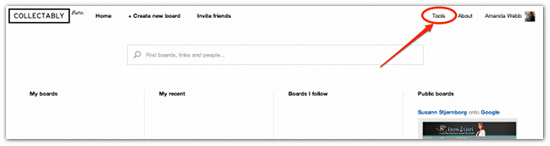
Save All Your Open Tabs To A Visual Board With Collectably

Click ‘Install’ to add the extension to Chrome (you have to use the Chrome browser for this to work)
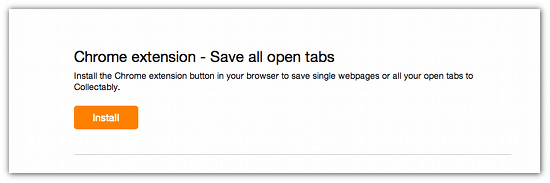
Save All Your Open Tabs To A Visual Board With Collectably

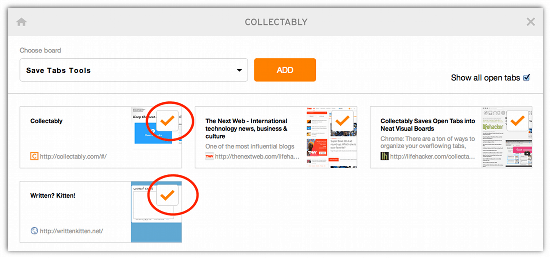
Once it has been installed you will see an orange ‘C’ appear to the top right of your browser window. When you click the ‘C” it opens a new window
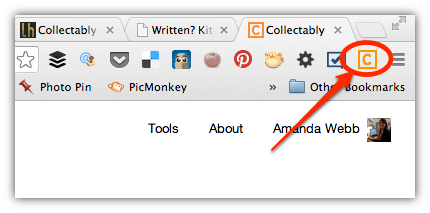
Save All Your Open Tabs To A Visual Board With Collectably

Check the box ‘show all open tabs’

Save All Your Open Tabs To A Visual Board With Collectably

You can uncheck any tabs that aren’t relevant to the board.
Save All Your Open Tabs To A Visual Board With Collectably

Finally you need to name the board by clicking ‘select board’ in the dropdown above the displayed tabs and click ‘Add’

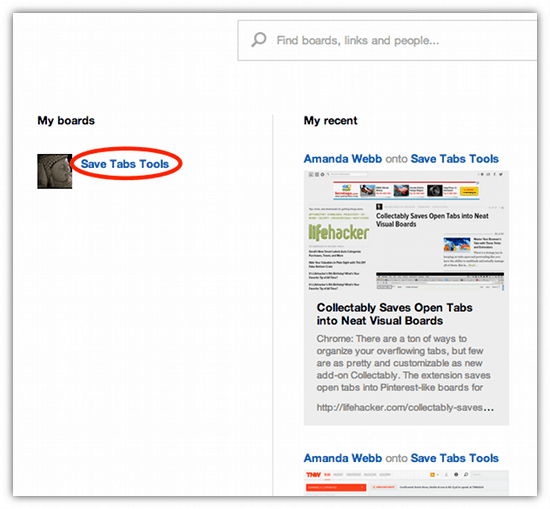
Now when you log in to Collectably your board will appear on the left hand side. Click on it and you are able to see and access all your saved tabs.
Save All Your Open Tabs To A Visual Board With Collectably

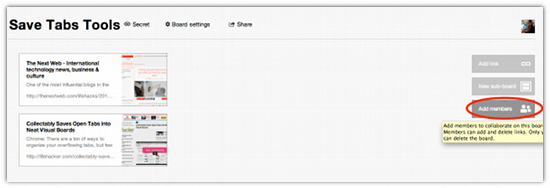
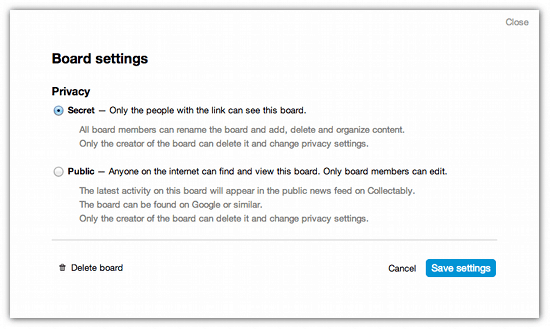
Boards you create are secret by default, only you can see them. You can collaborate with others by adding ‘members’ to your board. Just click ‘members’ on the right hand side of the screen and add the name or email address of another Collectably user.
Save All Your Open Tabs To A Visual Board With Collectably

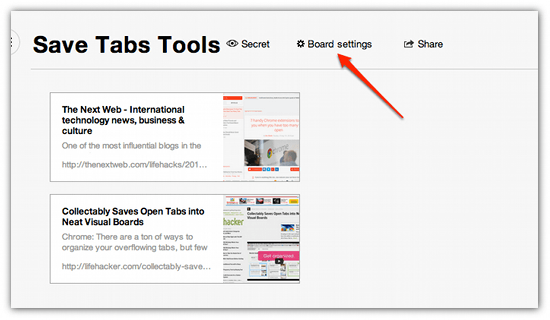
You can also choose your board to be public, this will allow you to share it as a link, it will be viewable to anyone on the internet. To do this access the ‘board settings’ menu and choose ‘Public’.
Save All Your Open Tabs To A Visual Board With Collectably

Save All Your Open Tabs To A Visual Board With Collectably

This is a great time saving tool. It means I can always easily access and add to the research material I am pursuing on various topics without having to search through tags on Delicious or try to remember where I saw a link on a specific topic. It’s also a great place to curate useful content I might want to share with others. For example I can share all my own blog posts on Facebook advertising just using one link.

If you enjoyed this blog post why not subscribe to my newsletter or my blog posts via email. Click here for more info.

Related Posts:

  • Amanda looks cool, I mean she's got shades, she's got a biker jacket. Her hair is red and her skin is white. the text reads 'Custom events - no tag manager'
    4 Simple Google Analytics 4 Custom Events You Can…
  • A woman with strawberry blonde hair, styled in a bob with bangs, looks surprised and amused as she scrolls endlessly down a very long web page on a laptop. She's wearing a bright orange jacket over a yellow top. Beside the laptop, her calico cat watches the screen with wide eyes and a raised paw. Floating above them are large black question marks and a speech bubble that reads ‘Still scrolling?’ The background is split: the left side is orange with halftone dots, and the right side is blue with halftone dots. The image has a vibrant, playful comic-book feel.
    Are Long Sales Pages Worth It? How to Track What…
  • facebook-google-up-a-tree
    How to Import Meta Ads Cost Data into GA4
  • that-analytics-podcast-measure-your-email-marketing-kay-peacey-v3
    Email Marketing Metrics That Matter: A Small Business Guide
Share
Tweet
Share
Pin
Email
WhatsApp

Filed Under: tools Tagged With: Blogging, chrome extension, research, save open tabs, save time

Primary Sidebar

Work With Me

From Google Analytics Training to the ROI Escalator Programme. Find out how I will help you get more ROI for your business

Amanda, smiling with red hair draped over her shoulders. You can trust her (but I would say that wouldn't I)

Get ROI Help Straight To Your Inbox

Get daily tips and inspiration on how improve your digital marketing ROI using analytics

Privacy Policy

Let's Connect

let's connect on LinkedIn Subscribe on YouTube Follow on Facebook

Footer

Google Analytics Certified
Very Blog Awards Winner
Social Media Examiner Winner
Social Agency Scout
  • Done For Your Google Analytics 4 Packages
  • Training & Mentoring
  • Speaking
  • That Analytics Podcast – Learn to love your stats
  • FREE Webinar: Finding the Gold in Your Google Analytics
  • Get In Touch

© Copyright 2017-2024 Spiderworking.com - Social Media For Small Business · All Rights Reserved · Privacy Policy · Cookie Policy · Maintained by FlyingFish.ie

