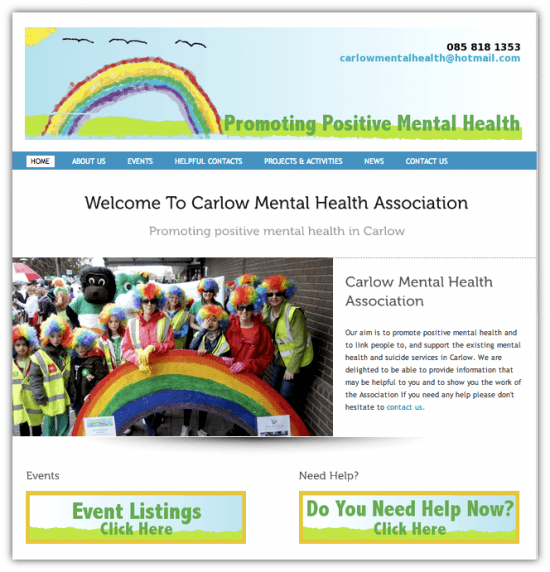
Spiderworking.com just developed it’s first website for a non-profit organisation. Working on a tight budget and a tight schedule we created a site for Carlow Mental Health.
I love working with non-profit organisations and community groups. The reward of seeing them thrive after I have provided training or set something up for them is huge but one problem that I see coming up time and time again with these groups is the quality of their websites. Of course most of these organisations would be on a very tight budget so it’s no surprise that very often these sites are built by a friend, a friend of a friend or a son or daughter for free. It’s great to get a site built for free but there can be some issues. Using WordPress to build a site is a great solution, here’s why.
1 Easy to update
We all need to update our websites from time to time but this can be a chore and even more complicated for an organisation that relies on volunteers who come and go. Your website needs to be easy to update and easy to train others to update. And this is where WordPress excels, it’s really easy to find your way around your website and update pages using their user friendly control panel.
2 Lots of free online help
If the person who set up your website is no longer available or if you have forgotten how to do something there is a huge amount of online help and support for WordPress. If you are having a problem you can be sure that there is a tutorial somewhere that will help you through it. When you are getting your site developed be sure to get the control panel login, your ftp login and your WordPress login from them so that you can access the site in future.
3 Low budget and no budget
Low budget – WordPress.org runs on your own hosting space. The software is free but you will have to pay a charge for web hosting and for your domain name (www.yourwebsitename.com) to a hosting company. You should be able to secure the hosting for around €100 a year but the price of your domain name can vary depending on the type you buy. We used WordPress.org to build the Carlow Mental Health Association Website.
No budget – WordPress.com is hosted by wordpress, it’s free to use and there are no extra costs unless you choose to upgrade parts of your site or buy a domain name. There are of course some disadvantages to running a site via WordPress.com, plug-ins are not available (see point 4), and it’s not as easy to customise. It is however free so worth considering if you have no budget at all.
4 Plugins that do almost anything
For the Carlow Mental Health association website they wanted to have a page devoted to events. Mental health week is coming up and it was important that they could publicise events via their site. They also wanted to be able to show off powerful images.
With WordPress this was easy. There are ‘plugins’ available for almost anything you need to do. A Plugin is an extra bit of software that works with your site to provide something new. Thanks to Ken from Eventmedia and Leon from ReverbStudios I installed Events Manager – a wonderful plug-in that handles events; form listings, to maps, to bookings and thanks to a recommendations from Beatrice Whelan, NextGen Gallery to display photographs effectively.
Don’t get too plugin happy. Installing too many plug-ins can slow down the load speed of your website. Pick and choose the ones you really need to help enhance what you are doing.
5 Lots of themes
Changing the look of your website once built on WordPress is fairly straightforward with Themes. Themes are website templates that change the way your site looks, there are lots of free ones to choose from that serve lots of different purposes, some look like websites, some like blogs and some are designed to work as portfolio sites. I used the Squirrel theme to build the Carlow Mental Health website but if they wanted to give it a face-lift in the years to come they could simply choose and customise a new theme.
If you’d like to talk to us about developing a low cost WordPress site for your non-profit organisation or community group get in touch.





